How to export WhatsApp Chats Securely

· 21 min read

If you've ever needed to show a WhatsApp conversation to someone outside the app for legal reasons, business records, or just to save a precious memory, you've probably realized that a simple backup won't cut it. While WhatsApp's built-in cloud backup is great for restoring your account on a new phone, it keeps your data locked away.

To create a formal, uneditable record, you need to export WhatsApp chats into a format like PDF. This is the only way to turn those conversations into a stable, shareable document you can actually use.

Why You Need to Export WhatsApp Chats

With over 100 billion messages flying back and forth every day, WhatsApp has become much more than a casual chat app. It's where business deals are struck, legal disputes unfold, and our most important relationships are chronicled.

Your conversations are records. They contain not just words, but timestamps, sender information, and attachments that provide critical context. A standard backup saves this information, but you can't easily read it, print it, or send it to a lawyer. To make that information useful in the real world, you have to export WhatsApp chats.

A smartphone with chat bubbles sends messages to a PDF document, symbolizing data export for legal, business, or personal use.

When Exporting Is Non-Negotiable

The need to export a chat history often pops up unexpectedly, and the stakes can be incredibly high. I've seen countless situations where a few simple screenshots just won't do. What's really needed is a complete, chronological record that's easy for anyone to read and understand.

Here are a few common scenarios where a proper export becomes essential:

  • Legal Proceedings: For things like custody battles, divorce settlements, or harassment claims, a clearly formatted chat history with accurate metadata can be powerful evidence.
  • Business and Contracts: Many informal agreements happen over WhatsApp. Exporting these conversations provides a clear paper trail for client communications, project details, and verbal contracts.
  • Personal Archiving: Some conversations are too precious to lose. Saving chats with loved ones ensures those memories are preserved forever, independent of any app or device.

The sheer scale of WhatsApp's user base, projected to exceed 3 billion monthly active users by 2026, means that more and more of our critical communications are happening there. For anyone in a dispute, this makes chat logs a potential goldmine of evidence. You can dig deeper into the platform's explosive growth and its impact at BankMyCell.com.

Key Takeaway: Just having your chats on your phone isn't enough. When you need to prove something, share a record, or save a memory, you need a clean, reliable export. From my experience, PDF is the most requested format because it's the easiest to share, is universally compatible, and preserves the look and feel of the original chat.

Common Reasons to Export WhatsApp Chats

Knowing why you need to export your chats will help you choose the best method and format. A casual memento has different requirements than a document intended for court.

The table below breaks down the most common motivations for exporting conversations. See which one best fits your situation.

Use Case Why Exporting Is Critical Recommended Format
Legal Evidence Must be clear, complete, and unalterable to be credible in court. PDF
Business Records Creates a formal log of agreements, orders, and client talks. PDF or CSV
Personal Keepsakes Preserves sentimental conversations in a readable format. PDF
Data Analysis Allows you to sort, filter, and analyze message data. CSV

Ultimately, choosing the right format comes down to what you plan to do with the data. For presentation, PDF is king. For analysis, CSV gives you the raw data you need to work with.

The Hidden Problems with WhatsApp's Built-In Export Tool

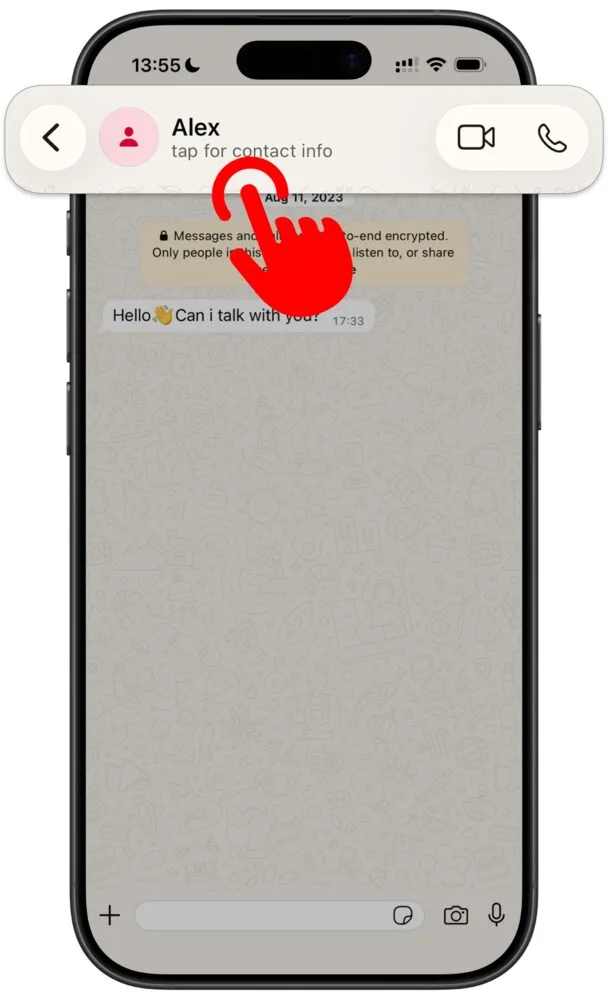
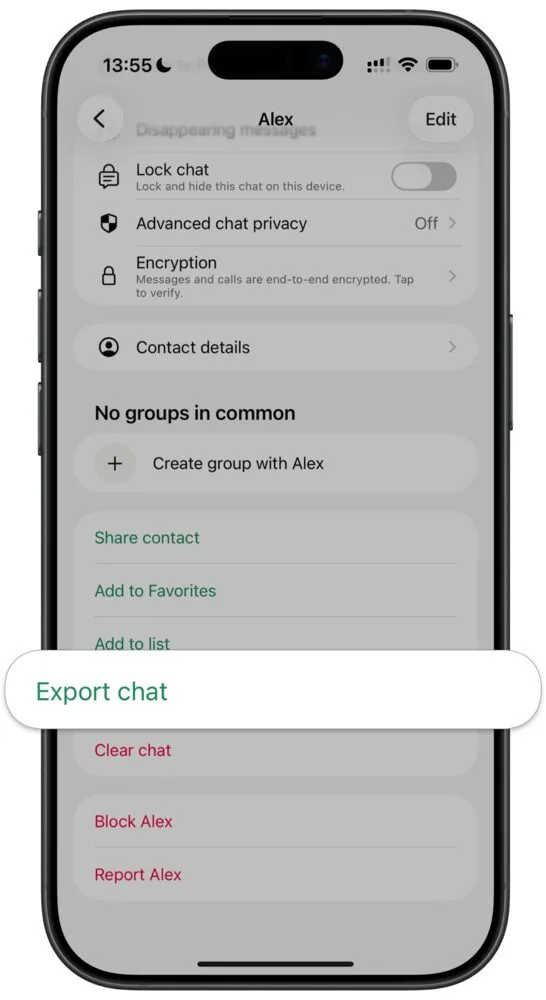
At first glance, WhatsApp's own export feature seems like an easy fix. A few taps, and you've got your chat history, right? Unfortunately, anyone who's actually tried to use this for something important, like a legal case or just saving a long-term conversation, quickly discovers it's a minefield of limitations.

When you need a complete, reliable record, the standard export process just doesn't cut it. Let's break down exactly where it falls short and why it can be a real headache.

A sketch of a smartphone displaying chat messages, surrounded by scattered, fragmented data documents.

The Frustrating 40,000 Message Cap

The biggest, and honestly most maddening, problem is the message cap. When you export a WhatsApp chat using the built-in function, you're not getting the whole story. The export is automatically cut short.

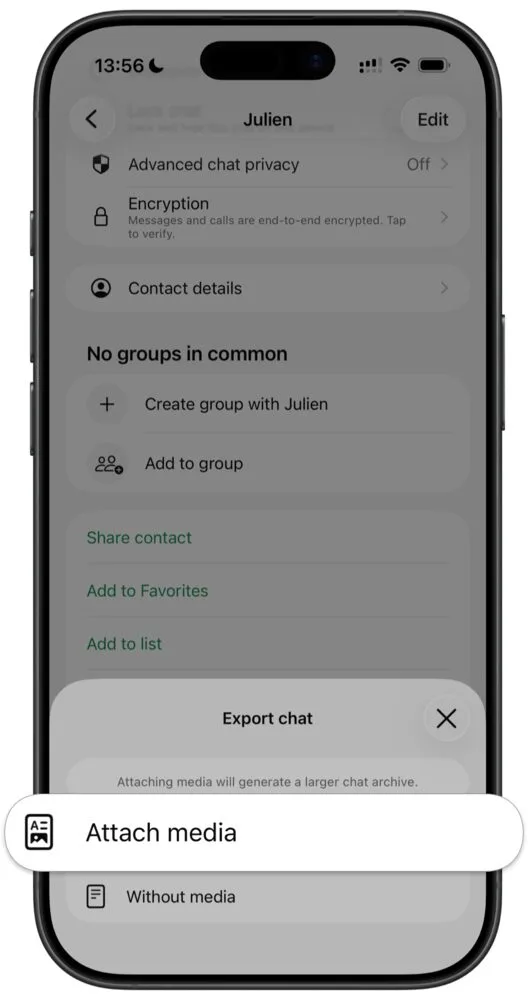
  • With Media: If you include photos and videos, WhatsApp only exports the last 10,000 messages.
  • Without Media: Exporting text-only gives you a bit more, but it still caps out at 40,000 messages.

For a quick, recent chat, that might be enough. But for conversations that span months or years, which is common in business projects, family histories, or custody disputes, this limit is a deal-breaker. You end up with an incomplete file where crucial early messages are simply gone.

I've seen people try to document a year-long harassment issue only to discover that the first nine months of evidence are missing from the export. It's a painful moment when you realize the official tool has let you down.

A Messy, Disconnected Process

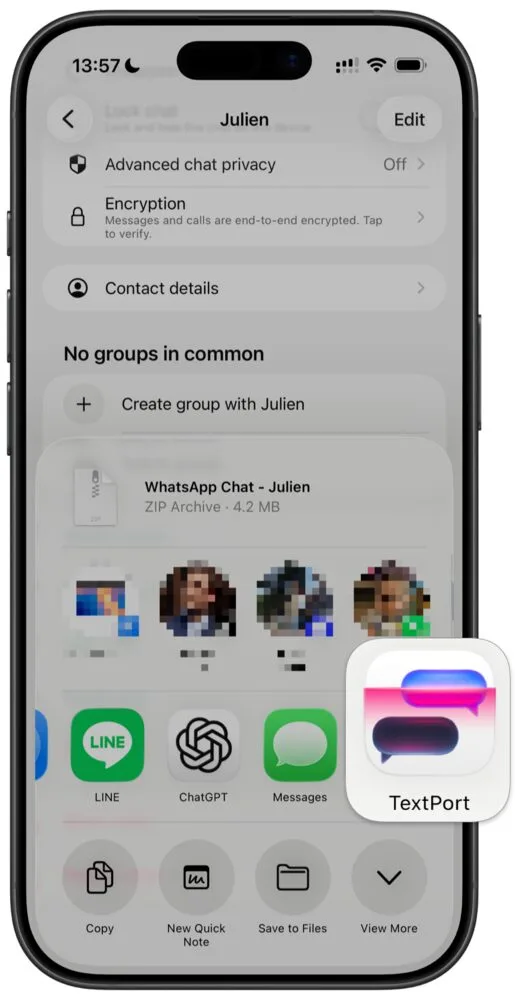
Even if your chat fits under the limit, the way WhatsApp packages your data is far from ideal. You get a .zip file containing a plain .txt file for the messages and, if you included them, separate folders for all your media.

This means your photos, videos, and voice notes are completely detached from the conversation. You're left with a wall of text and a jumble of files, forced to manually match timestamps to figure out what was sent when. It's a tedious, confusing puzzle.

The output is disorganized by design. You're left with a plain text file that strips away all the visual formatting of the chat, making it look nothing like the original conversation. This lack of visual authenticity can severely undermine its credibility.

A lawyer I once worked with described a client's .txt export as "a chronological nightmare." It was nearly impossible to follow the conversational flow, see who said what at a glance, or connect a specific photo to its context in the chat. It's simply not a professional or practical format for any serious purpose.

Lost Formatting and Critical Metadata

The basic .txt file that WhatsApp generates loses all the nuances that give a conversation its context and authenticity. It's a skeleton of the real chat.

Here's what disappears in the export:

  • Visual Layout: The familiar chat bubbles, colors, and message alignment are completely gone.
  • Read Receipts: There's no way to prove a message was delivered, let alone read.
  • Rich Media Previews: Instead of seeing an image thumbnail in the flow of the conversation, you just get a useless placeholder like <image omitted>.

Trying to present this mess in a legal or professional setting is a non-starter. It takes a ton of work just to make it readable, and even then, it lacks the visual proof that a properly formatted document provides. This is a huge reason why so many of our customers at TextPort need PDFs, as they are the easiest format to share and present professionally. A PDF provides a static, uneditable snapshot that looks just like the original chat, which is exactly what you need for official records.

In the end, while the built-in option to export WhatsApp chats is free, you definitely get what you pay for. It's a superficial tool that fails when you need it most, leaving you with incomplete data and a document that just doesn't hold up under scrutiny.

Picking the Right Export Format: PDF, CSV, or TXT?

So, you need to get your WhatsApp chats off your phone. The first big question you'll hit is what format to use. It might seem like a small detail, but choosing between a PDF, CSV, or TXT file will completely change what you can do with your exported conversation.

The right choice comes down to one thing: what's your end goal? Are you saving a chat for court, analyzing customer data for your business, or just keeping a personal memento? Let's walk through which format is best for each job.

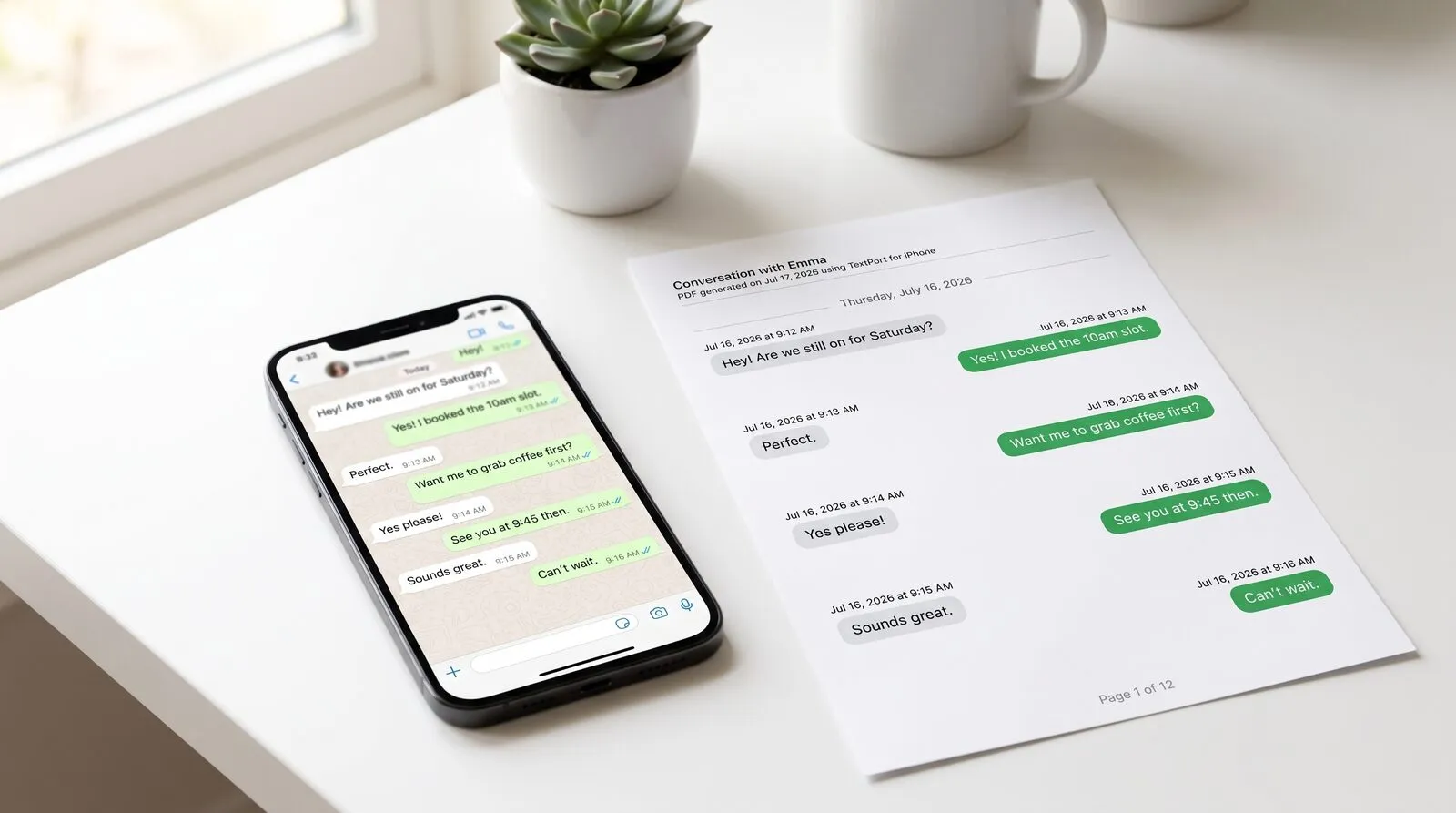
For most situations, PDF is the way to go. In my experience, it's what people ask for most often, and for good reason: it's the easiest format to share and read. A PDF essentially takes a digital screenshot of your chat, preserving the layout, formatting, and content exactly as it appears on your screen.

This visual authenticity is what makes it so powerful for any official use.

  • Looks the same everywhere. A PDF will look identical whether it's opened on a judge's desktop, a lawyer's tablet, or your boss's phone.
  • Credibly secure. It's much harder to tamper with a PDF than a simple text file, which gives it a layer of authenticity that holds up in legal and professional settings.
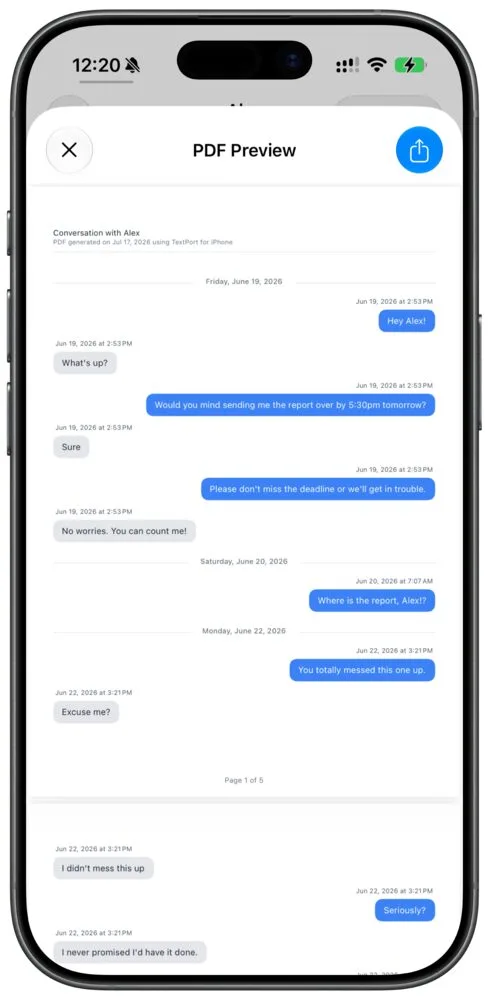
  • Instantly recognizable. The file shows the classic chat bubble layout with names and timestamps, so anyone can understand the flow of conversation without any explanation.

Bottom line: if you need to submit a chat history for a court case, a police report, or an internal HR investigation, a clean, properly formatted PDF is your best bet. It's the closest you can get to handing over your phone.

When a Spreadsheet Is Your Best Friend: CSV

While a PDF is perfect for presentation, a CSV (Comma-Separated Values) file is built for digging into the data. When you export a chat as a CSV, every single message, along with its metadata, sender, date, time, gets neatly organized into a spreadsheet.

This becomes incredibly practical when you need to:

  • Analyze business data. A small business owner could export client chats to track response times, identify frequently asked questions, or just keep a searchable log of all customer interactions.
  • Sort and filter conversations. Need to find every message from one person in a massive group chat? Or isolate all messages sent last Tuesday? A CSV lets you do that in seconds with Excel or Google Sheets.
  • Review huge volumes of text. For legal teams sifting through thousands of messages in discovery, a CSV is a lifesaver. It allows them to run keyword searches and spot patterns far more efficiently than scrolling through a hundred-page PDF.

If your goal is to search, sort, quantify, or otherwise work with the information in your chat, CSV is the tool for the job.

Many of our clients, from harassment victims to parents in custody battles, are dealing with an overwhelming number of messages. WhatsApp's native export often fails them with its 40,000-message limit and jumbled formatting. This is where tools like TextPort shine, by transcribing screen recordings into court-ready PDFs or searchable CSVs that preserve every detail. You can find more stats on how businesses use WhatsApp over at YCloud.com.

The Simple (and Often Flawed) TXT File

Finally, we have the humble TXT file. This is the most basic format you can get, and it's the default for WhatsApp's built-in export function. A TXT file is nothing more than plain text, completely stripped of any formatting, colors, or chat bubbles.

A TXT file is really only good for a quick-and-dirty backup where you just need the raw text. It's small and opens on any device, but that's where the benefits end. The lack of formatting makes long conversations incredibly difficult to follow, and it's almost useless for any official purpose. Trying to present a TXT file as evidence would almost certainly be challenged for its lack of authenticity and poor readability.


Which WhatsApp Export Format Is Right for You?

Choosing an export format doesn't have to be complicated. It all boils down to what you plan to do with the file once it's off your phone. Think about your audience and your purpose.

Here's a quick-glance table to help you decide.

Format Best For Pros Cons
PDF Legal evidence, professional reports, sharing with non-technical people. Easy to read, retains original chat layout, hard to alter, looks professional. Not suitable for data analysis, can create very large files.
CSV Data analysis, business intelligence, searching large volumes of messages. Easy to sort, filter, and search. Great for spreadsheets and databases. Not visually intuitive, requires software (like Excel) to view properly.
TXT Simple personal backups, quick text-only transcripts. Small file size, universally compatible, fast to create. Lacks all formatting, difficult to read, not suitable for official use.

Ultimately, a PDF is best for showing, a CSV is best for analyzing, and a TXT is best for simply storing raw text. Pick the one that aligns with your needs, and you'll save yourself a lot of headaches down the road.

A Better Way to Export Your Chat History

When you're dealing with something serious like a custody battle or building a harassment case, the last thing you need is a tool that lets you down. As we've seen, WhatsApp's built-in export feature has some major flaws, message caps and disorganized files, that often make it useless for anything important. This is where a modern approach, built for these real-world challenges, really shines.

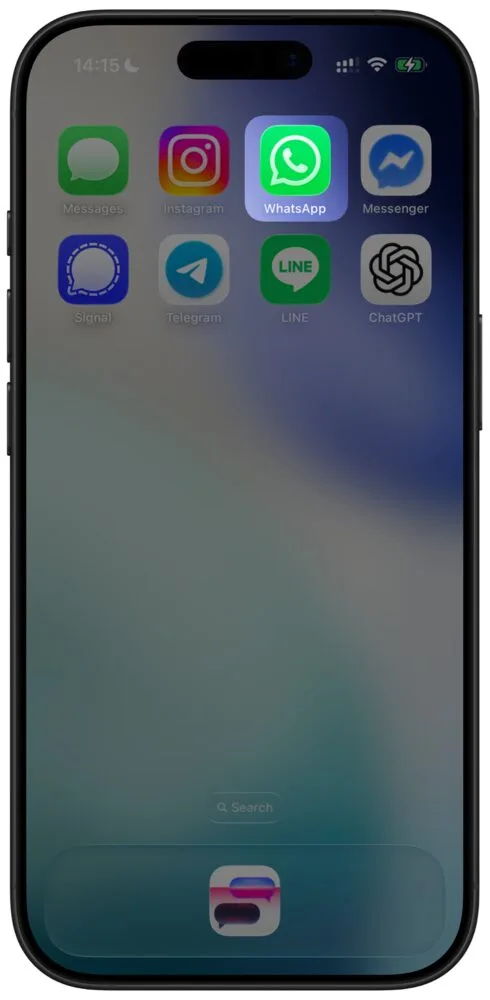
For anyone with an iPhone, a tool like TextPort offers a solid way to export an unlimited WhatsApp chat history. The best part? You don't need a computer or any complicated software. It's a simple but powerful process designed to capture a complete, authentic record of your entire conversation.

How Screen Recording Creates a Perfect Record

The genius of this method is its simplicity. Instead of trying to pull data from WhatsApp's backend, which is what the app itself limits, you capture the conversation exactly as it appears on your screen. You just start a screen recording on your iPhone and slowly scroll through the entire chat history, from beginning to end.

Once the recording is done, the tool takes over. It analyzes the video, transcribes every single message, and puts the entire conversation back together in chronological order. This technique completely bypasses WhatsApp's frustrating export limits.

This approach also makes sure all the crucial details are kept intact:

  • Sender Names: Every message is clearly tied to the right person.
  • Timestamps: The date and time are captured for each message, creating a precise timeline.
  • Media Markers: While it doesn't embed the actual files, the export clearly shows where photos, videos, and voice notes appeared in the chat, preserving the original context.

What you get is a clean, continuous document that accurately reflects the real flow of your conversation, no matter how many years it spans.

From a Jumbled Chat to a Professional PDF

I've worked with clients who were completely overwhelmed trying to document years of communication for court. Imagine the relief of turning dozens of fragmented text files into a single, searchable PDF that presents the entire conversation clearly and chronologically. That's exactly what a capture-based method provides.

A complete and visually accurate record is your most powerful asset. A PDF created from a screen capture mirrors the original chat, making it instantly credible to a lawyer, judge, or HR manager. It removes any doubt about the conversation's authenticity.

The final output is designed for real-world use. You receive a professional-grade document you can save, print, or share with total confidence. Whether you need to export WhatsApp chats for legal evidence or just for your own records, this gives you the complete, undeniable proof you need.

This infographic breaks down which file format might work best for you after you've exported the conversation.

A flowchart displays three chat export format options: PDF, CSV, and TXT, each with a relevant icon.

As you can see, a PDF is your best bet for official documents, CSV is ideal for working with data, and a simple TXT file works for basic text storage.

Empowering People in Critical Situations

With WhatsApp's massive global user base, a scale you can see detailed on WorldPopulationReview.com, there's a real need for better export tools. This is especially true for people in vulnerable situations. For someone documenting abuse, a small business owner keeping client records, or an individual in a legal dispute, the native export function is often tedious and simply can't capture the long histories needed for court.

Tools that use mobile-first technology let you record WhatsApp chat scrolls right on your iPhone and automatically turn them into legal-ready PDFs with all the metadata preserved. This approach saves an incredible amount of time and stress during high-pressure situations like custody fights or harassment claims. By offering unlimited exports with a strong focus on privacy, these tools finally give you true control over your own data when it matters most.

Best Practices for Preparing Chat Evidence

When you need to export WhatsApp chats for a legal case, an HR issue, or even a police report, how you capture that evidence is just as important as what's in it. I've seen situations where crucial conversations were dismissed simply because they weren't preserved correctly.

What you're really aiming for is a complete, authentic record of the conversation. Any step that looks like you could have tampered with the chat, even accidentally, can undermine its credibility. A judge or investigator needs to trust that they're seeing the full, unaltered picture.

Prioritize a Visually Accurate Format

Your first big decision is the format, and it's a critical one. It's tempting to just copy-paste the text into a document or use a basic TXT export. Don't do it. A plain text file is far too easy to edit, which makes it immediately suspect in any official review.

This is why a PDF created from a high-fidelity capture is the gold standard. It keeps the chat's original look and feel, the message bubbles, the sender names, the timestamps, all in chronological order. That visual proof makes the evidence instantly familiar and much harder to challenge.

Based on what our own customers request most, PDF is the clear winner. Its main advantage is that it's the easiest format to share and present professionally. A well-made PDF looks the same everywhere and acts as a static snapshot, which is exactly what you need for legal and official submissions.

Maintain the Chain of Custody

"Chain of custody" might sound like something out of a crime show, but the principle is simple and applies here: you need to be able to explain where your evidence came from. Think of it as creating a history for your chat export.

You should be ready to document exactly how you captured the chat. Note the date, the method, and any tools you used (like TextPort). This transparency shows that the file you're presenting is a true and accurate copy, which builds trust.

  • Do Not Edit: This is the cardinal rule. Never alter the exported file. Don't crop messages, black out text with a digital marker, or change a single word.
  • Capture Everything: Export the entire relevant conversation, not just the messages that help your case. Selectively deleting messages is known as "spoliation of evidence" and can have serious legal consequences.
  • Preserve Metadata: Make sure your export method saves all the critical metadata. This includes sender names, phone numbers (if they're visible in the chat), and precise timestamps for every message sent and received.

Preserve the Full Context

A single message pulled out of context is easily twisted. A comment that seems aggressive on its own might have been a sarcastic response to a joke sent minutes earlier. Without that surrounding conversation, the true meaning is completely lost.

To avoid any misinterpretation, always capture more than you think you need. Include a healthy chunk of the conversation from before and after the key moments. It demonstrates that you have nothing to hide and are presenting the full story.

An exported chat should read like a complete script, not just a highlight reel. By following these practices, you can confidently export WhatsApp chats into a document that's clear, credible, and ready for whatever scrutiny it may face.

Frequently Asked Questions About Exporting WhatsApp Chats

When it's time to export a WhatsApp chat, a few common questions always seem to pop up. Whether you're pulling together evidence for a legal matter or just trying to save a meaningful conversation, getting a complete and usable record can feel surprisingly complicated. Let's walk through the most frequent sticking points I've seen and how to handle them.

Can I Export a WhatsApp Chat That Is Several Years Old?

You absolutely can, but this is exactly where WhatsApp's built-in export feature runs into trouble. The native tool imposes a strict limit on your export: 40,000 messages without media, or just 10,000 messages if you include it. For any chat that's been active for years, that limit can easily chop off the beginning of your conversation history.

This is a huge issue in legal or business contexts, where the start of a discussion is often just as critical as the most recent messages.

The way around this is to sidestep WhatsApp's export function entirely. Tools designed to capture the chat as you scroll, like TextPort, create a single, continuous document of the entire conversation. This approach bypasses that arbitrary message cap, ensuring the full history is preserved. It's the only way to guarantee you have a complete, credible record of a long-running chat.

Is an Exported WhatsApp Chat Admissible in Court?

Yes, exported WhatsApp chats are used as evidence all the time, but admissibility comes down to one thing: authenticity. A simple text file is incredibly easy to edit, making it simple for opposing counsel to argue it's been tampered with. A judge needs to trust that what they're seeing is a true and accurate copy.

This is why a visually accurate PDF, created from a screen capture or recording, carries so much more weight. It preserves the look and feel of the original app with sender names, timestamps, and chat bubbles, making it far more convincing. To build a strong case, your best bet is to capture the full, unedited chat and be ready to explain the method you used to export it.

Of course, legal standards vary by jurisdiction, so you should always run this by a legal professional for guidance specific to your situation.

What Is the Best Way to Share an Exported WhatsApp Chat?

From my experience helping people with this, PDF is almost always the right answer. The reason is its universal compatibility and how easy it is to share. A PDF document looks identical whether it's opened on a Mac, a PC, a tablet, or a smartphone. You can be confident the other person is seeing exactly what you sent, with no weird formatting glitches.

That reliability is why it's the standard for legal filings and professional reports. Sending a raw TXT or CSV file is a gamble, the recipient might not have the right software, or the file could open as a wall of unreadable text.

For sharing with lawyers, clients, or anyone who isn't tech-savvy, a clean PDF is the most professional and foolproof format you can choose.

Can Someone Stop Me from Exporting a Chat?

Yes, it is possible. WhatsApp has introduced a feature known as "Advanced Chat Privacy," which can be activated for specific chats. If someone in the chat enables this, it completely disables the native export function for all participants.

This setting also stops media from auto-downloading and restricts certain AI functionalities. In group chats, an admin can secure this setting to prevent others from changing it. In one-on-one chats, either participant can activate it at any time. Therefore, if you find the export option missing, this feature is most likely responsible.

However, with TextPort, you can still export these conversations using screen recordings and screenshots.


For situations where native exports are blocked or just don't cut it, a dedicated third-party tool is your best path forward. TextPort helps you capture and transform any message history into a clean, court-ready PDF or a data-friendly spreadsheet, right from your iPhone. Find out how you can create complete, credible records from any chat app.

TextPort

Start exporting your messages

Available for iPhone, Mac, and Windows. No computer required for the mobile app.

Download for iPhone