
Competitor comparison
TextPort vs iMazing: your messages as a PDF, with or without a computer
TextPort is an iPhone app: pick a chat and you get a PDF with the sender, date and time above every message, no computer needed. iMazing runs on a Mac or PC and reads your messages from a backup it makes first. Need one chat today? Use TextPort on your iPhone. Want your whole history? TextPort's Mac and Windows apps do that for free.
Our take
If you're weighing these two, you most likely need one conversation out of your phone, soon, for court, a custody case or a landlord dispute. That's the job TextPort was built for, and you do it from the phone in your hand. iMazing is software for managing an iPhone from a computer, and you can't see a single message until it has backed up the phone. Not every chat that matters is in Messages, either. TextPort reads WhatsApp, Instagram, Messenger and Signal too.
At a glance
Where each one runs, what it reads, what it prints
TextPort's iPhone app, its two free desktop apps and iMazing, as of November 4, 2026. Prices are in US dollars.
| Compared | TextPort for iPhone | TextPort for Mac and Windows | iMazing |
|---|---|---|---|
| Runs on | Your iPhone or iPad | A Mac (macOS 14.6 or later) or a PC with Windows 10 (version 2004 or later) or 11 | A Mac or PC, which reaches your iPhone over USB or local Wi-Fi |
| Backup needed | No. No computer, cable or backup | Mac: no, it reads the Mac's own Messages. Windows: yes, it backs up the iPhone to the PC over USB, or opens a backup already on the PC | Yes. It makes a backup first, messages only or full, and both take about the same time |
| Apple Messages | iMessage and SMS, read word for word through the TextPort Shortcut (iOS 26.4 or later) | iMessage and SMS, with attachments | SMS, MMS, iMessage and RCS |
| Other chat apps | WhatsApp, from WhatsApp's own export file. Instagram, Messenger, Signal, Telegram and any other app, from a screen recording or screenshots | Apple Messages only | WhatsApp, from an iTunes or iMazing backup. Instagram, Messenger, Signal and Telegram aren't listed |
| Above each message in the PDF | Sender's name and number, date and time, by default | The same | Contact details and a time on every message are export settings you turn on |
| Header and footer | Page 1: who the chat is with, and when and with which app the PDF was made. Every page: the page number and a document ID | The same, and the first line names the Mac, or the iPhone the backup came from | Can add a footer to every page with the iPhone's name and serial number, the export date and when the Messages database last changed |
| Formats | PDF, CSV, TXT, print | PDF, CSV, TXT, attachments as a ZIP. Print on the Mac | PDF, Excel or CSV, TXT, print. RSMF and signed PDFs need a Business subscription |
| Cost | Your first 3 conversations import free, then a weekly, monthly or annual subscription through the App Store | Free, with no account and no message cap | Yearly subscription only. Personal is $49.99 a year for up to 5 devices. The trial has no time limit but caps how many messages you can transfer |
The PDF
What the person reading your PDF sees
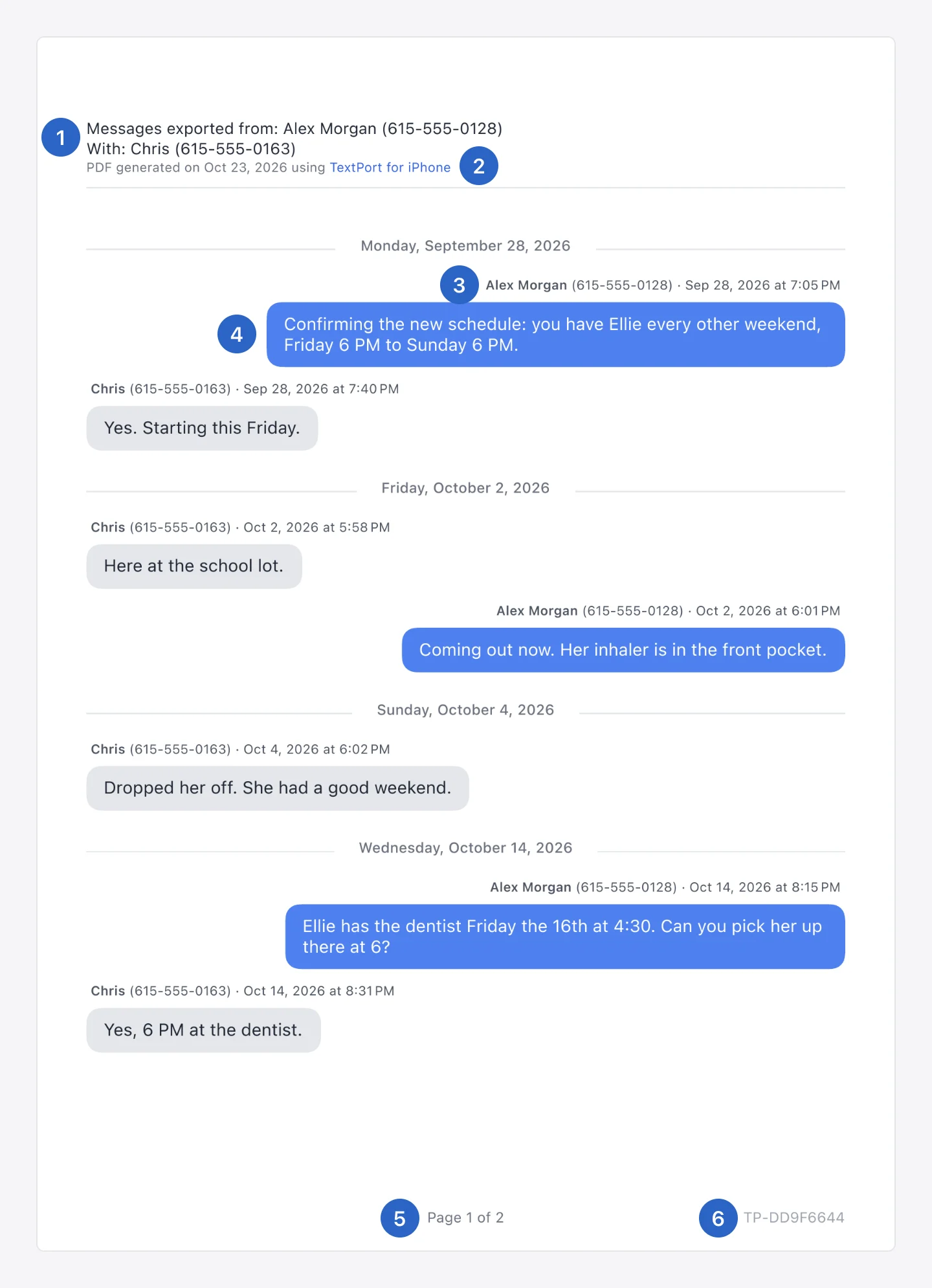
Whoever reads your PDF wasn't in the chat. Your lawyer, a mediator or a judge has to tell who wrote each message and when without calling you to ask. Here's what TextPort prints by default (the numbers match the picture):
- •At the top (1, 2): who the chat is with, the day the PDF was made and which TextPort app made it. On the iPhone, the first line also names you and your number when TextPort knows them.
- •Above every message (3, 4): the sender's name and number, the date and the time. Each new day gets its own divider.
- •At the bottom of every page (5, 6): the page number, as in "Page 1 of 2", and a document ID.
In iMazing, the sender's details and a time on every message are settings you switch on before you export: "Show contact details" and "Show time for all messages". iMazing's guide says to turn both on for legal exports. It can also put the iPhone's name and serial number, the export date and the date the Messages database last changed in the footer of every page.
Taking it to court? TextPort makes the PDF, and what your court accepts is a question for your lawyer. Start with whether text messages can be used in court.
One chat, start to finish
How you get one conversation out of each
Say you need one thread for a meeting with your lawyer on Friday. This is what each route asks of you.
TextPort, on your iPhone
- 1.Open TextPort and tap Add Chat, then Import from Messages.
- 2.The first time, add the TextPort Shortcut when the app asks. It needs iOS 26.4 or later.
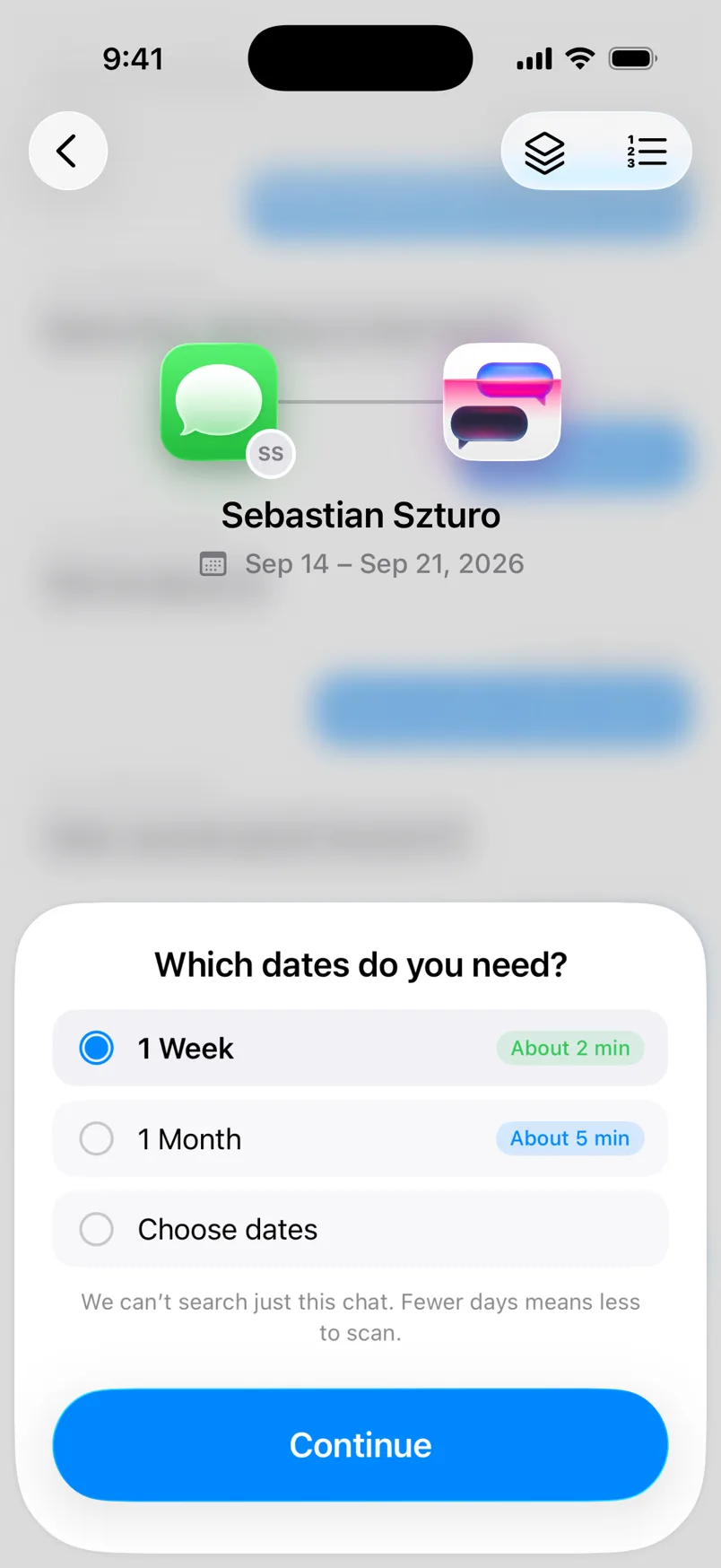
- 3.Tap Find chats, pick the chat and the dates, then tap Start import.
- 4.Export the PDF. Print it, save it, or send your lawyer a link to the file.
iMazing, on your computer
- 1.Install iMazing on your computer.
- 2.Connect your iPhone by USB or Wi-Fi.
- 3.Wait for the backup. iMazing says the first one may take 30 minutes or more, and sometimes 1 to 2 hours or more on a high-capacity iPhone that's full of data.
- 4.Find the conversation and switch on Show contact details and Show time for all messages.
- 5.Export the PDF.
Beyond one thread
Other chat apps, and the whole history
WhatsApp, Instagram, Messenger and Signal
WhatsApp chats come in through WhatsApp's own Export Chat file, and TextPort reads it word for word. For Instagram, Messenger, Signal, Telegram, Snapchat or any other app, you scroll through the chat while you record the screen, or you take screenshots. TextPort reads those with AI, and you can fix any text, time or sender before you export. iMazing reads WhatsApp from an iTunes or iMazing backup. It doesn't list Instagram, Messenger, Signal, Telegram or Snapchat.
Years of texts on a Mac or PC, for free
When you want every conversation at once, a computer is the right tool, and TextPort has two free ones. TextPort for Mac reads the Messages on your Mac, including what your iPhone has synced to it through Messages in iCloud. TextPort for Windows, on the Microsoft Store, backs up your iPhone to the PC over USB, or opens an Apple Devices or iTunes backup that's already there. Both export every chat at once to PDF, CSV or TXT, need no account and keep your messages on the computer. In iMazing, the same job needs the yearly subscription.
Weighing more tools? See other iMazing alternatives, Decipher TextMessage vs iMazing, or what iMazing costs in 2026.
TextPort for iPhone
Need the chat today? Start on your iPhone
Install TextPort, pick the conversation and the dates, and a few minutes later you have the PDF. In November 2026 it's rated 4.4 out of 5 from more than 1,500 ratings on the US App Store.
Pick TextPort when you need:
- •One conversation as a PDF, with no computer
- •A WhatsApp, Instagram or Messenger chat in the same PDF layout
- •A link that sends the exact file to your lawyer, for 7 days by default
FAQ
TextPort and iMazing questions
-
You can import your first 3 conversations on the iPhone for free. After that, TextPort for iPhone is a weekly, monthly or annual subscription through the App Store. TextPort for Mac and TextPort for Windows are free, with no account.
-
TextPort: Text Message Export is sold on the App Store by Tsubasa Technologies LLC. You can lock the app with Face ID, and a link you send to your lawyer stops working after 7 days by default.
-
No. iMazing is desktop software, and its maker, DigiDNA, has no app on the US App Store that exports messages. TextPort is the one that runs on the iPhone.
-
Not for whole conversations. iMazing is a yearly subscription. Its trial has no time limit, but it transfers only 25 messages and 25 WhatsApp messages. TextPort for Mac and TextPort for Windows export every message for free.
-
Yes, on the iPhone. In WhatsApp, use Export Chat on the conversation and open the file in TextPort. The Mac and Windows apps read Apple Messages only.

Start exporting your messages
Available for iPhone, Mac, and Windows. No computer required.
