

How to turn analytics off on Mac
Mac
2 steps
·
Updated
Quick answer
In TextPort for Mac:
- Choose TextPort › Settings….
- Click General.
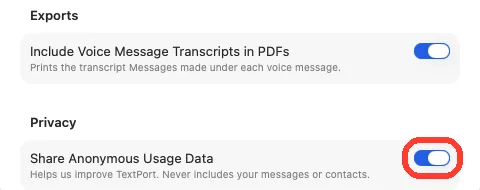
- Under Privacy, turn off Share Anonymous Usage Data.
What you need
- ✓TextPort for Mac
Steps
-
Choose TextPort › Settings…
It is in the menu bar at the top of the screen. The General tab opens.
Or press Command-, (comma).
-
Turn off Share Anonymous Usage Data
It is at the bottom, under Privacy. The change works right away.
Done
TextPort stops sharing usage data. Turn the switch on to share it again.
Problems
What you seeWhat to do
Settings opens on About.
Click General at the top of the window.
None of these match.
Email [email protected]. Say which step you were on. Say what you saw. We usually reply within a day.
Questions
-
Usage data that helps improve TextPort. It never includes your messages or contacts.
-
No. Every feature works the same.


Start exporting your messages
Available for iPhone, Mac, and Windows. No computer required.
