
How to Print WhatsApp (or Any) Chat History for USCIS
Chat history is one of the most commonly submitted forms of relationship evidence in US immigration cases. If you are filing a K-1 fiancé petition, a marriage-based green card, or removing conditions on a two-year card, odds are someone has told you to include your WhatsApp, iMessage, or Instagram conversations.
That advice is sound, but it comes with two catches people rarely explain. First, USCIS has real format rules, and raw phone screenshots quietly fail some of them. Second, immigration attorneys agree on how much chat history to include, and "all of it" is the wrong answer. This guide covers both: the format rules that actually apply, and the curation that separates a persuasive exhibit from an unread pile.
To be clear up front: USCIS has no rule that says "submit your chat logs." Chat history is accepted as relationship evidence, and filing-prep services and attorneys widely recommend it, but it lives under the catch-all category on the forms, not the enumerated list. The goal is to hand an officer a clean, believable record that supports your stronger evidence, formatted the way their system expects.
What USCIS actually accepts
Start with the format rules, because they are verifiable and they trip people up.
If you file online through myUSCIS, the tips for filing forms online spell it out: each file must be 12MB or smaller, in PDF, JPG, or JPEG format (some forms also accept TIF or TIFF), and you must not encrypt or password protect your files. Foreign-language documents need a certified English translation uploaded alongside them.
Here is the detail that catches most iPhone users: screenshots save as PNG or HEIC files, and neither is on the accepted format list for online filing. A folder of raw screenshots dragged straight into the upload form can be rejected on format alone — and you may not find out until the system throws an error or an officer flags the submission.
The fix is simple: convert your screenshots to PDF or JPG before you upload. Any export that produces a PDF sidesteps the problem entirely, and a single combined PDF is easier for an officer to page through than dozens of loose image files.
Watch the 12MB per-file ceiling too. A long conversation captured as high-resolution screenshots and merged into one PDF can grow large quickly. If a file exceeds the limit, split it into logical pieces — by month, or by conversation — rather than compressing it until the text goes soft. Legibility is a requirement, so a sharp file always beats a bloated, blurry one.
If you file on paper, the tips for filing forms by mail apply instead:
- Single-sided printing on standard 8.5 x 11 inch pages.
- No binders, photo albums, scrapbooks, or digital media (USB drives, CDs) — those get returned unprocessed.
- Legible copies only — not blurry, faded, skewed, or cut off.
- Black-and-white scans are acceptable, so you do not need color printing for a chat log.
That legibility rule matters for chat exports specifically. A screenshot printed too small to shrink a long thread onto one page is exactly the kind of cut-off, hard-to-read submission the guidance warns against.
The through-line for both filing methods is legibility and clean formatting. A text-searchable, properly paginated PDF clears these bars without you having to think about them — and an export method that outputs one from the start saves you the conversion, splitting, and legibility headaches above.
How much chat history to include
Now the judgment call. The instinct is to prove your relationship by sheer volume: every message, every day, all of it. Immigration attorneys consistently push back on this.
The reason is concrete: a complete iPhone chat export can run well past 300 pages. Nobody reviewing your case is going to read 300 pages of "good morning" and "text me when you land," and submitting them signals that you could not tell which evidence mattered.
The standard advice is to sample rather than dump. What you are trying to demonstrate is consistent communication over time, not raw word count. A well-organized sample does that far better than a firehose:
- Pick representative stretches across the relevant period rather than one continuous month. Showing that you communicated in January, in April, in August, and in December makes the point that the relationship is ongoing.
- Keep enough context that nothing looks cherry-picked. Include the surrounding back-and-forth, not a single isolated line pulled out to sound meaningful.
- Cover milestones where a conversation naturally documents something real: planning a visit, discussing the wedding, coordinating a move, talking through family.
CitizenPath, a filing-prep service, frames phone and text records as "evidence of intimacy" that shows a couple communicates on a regular basis, and recommends grouping evidence by category, in chronological order, with labels. That is the mindset: curate down to a sample that tells a clean story, then organize it so an officer can follow it in seconds.
Be honest about what chat history can and cannot prove. Boundless, another filing-prep service, rates phone and chat records as medium-strength evidence, below joint finances and property. Officers see relationship documentation constantly, and they know that message logs are the easiest kind to manufacture in bulk.
So the value of your chat history is not in its length; it is in how naturally it corroborates the rest of your file. Ten pages that echo a trip you also documented with plane tickets and photos will do more work than a hundred pages of small talk floating on their own.
Curation has a practical payoff, too. Every page you include is a page you may have to translate (more on that below), scan, name, and keep under the file-size limit. When in doubt, include the exchanges that connect to a concrete event and trim the filler.
Exporting your chats, app by app
The right export method depends on the app. Here is the practical version for the ones people file most.
WhatsApp is the easiest of these apps to file cleanly, because you can hand its export straight to TextPort and get a paginated, timestamped PDF back. Open the chat, tap the contact's name, scroll down, and tap Export chat — then pick TextPort from the share sheet.
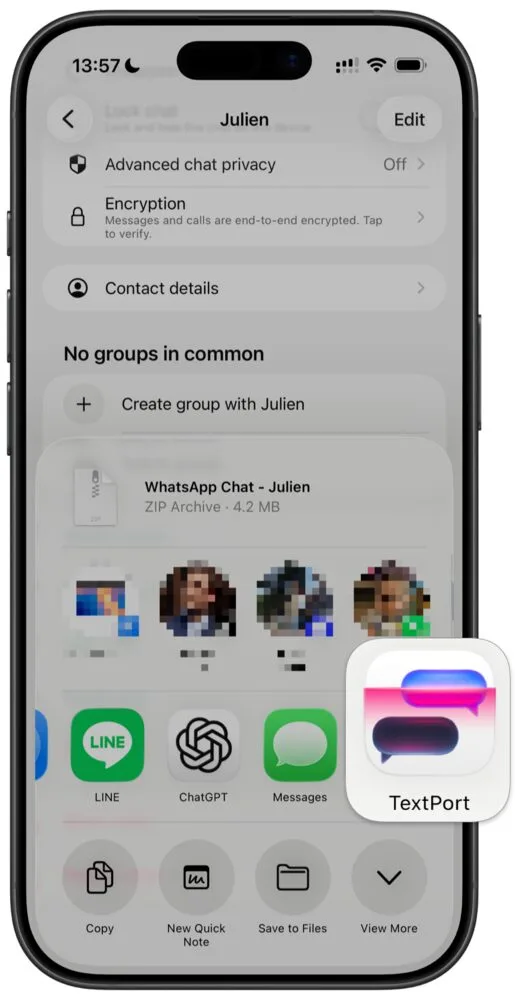
TextPort reads the exported chat and rebuilds it into a formatted conversation — every message with its sender and timestamp — that you export as a PDF ready to upload or print. Because it parses the real export rather than a screenshot, nothing is paraphrased or dropped. Our dedicated WhatsApp export guide walks through all five steps with screenshots, and how to print WhatsApp messages from iPhone covers printing the result directly over AirPrint.
iMessage
iMessage has no built-in export. Apple gives you no "export this conversation" button, so on your own you are left screenshotting the thread and assembling and converting PNG or HEIC files by hand.
TextPort pulls the conversation straight out of iMessage, right on your iPhone, and turns it into a timestamped, text-searchable PDF where every message shows its sender and date — exactly the format a filing wants. Keep the original conversation on your phone as your source.
Instagram, Messenger, and Telegram
These apps vary, and their in-app data-download menus change often, so we won't describe menus we can't verify for your version. Two routes always work regardless of the app: screenshot the conversation as you scroll, or screen-record the thread and turn the recording into a PDF. Because the screen-recording approach works from what is on your screen, it handles any chat app the same way.
That matters for immigration filings specifically. Cross-border couples often talk across whatever apps are common in each country, so a single relationship might live half on WhatsApp, some on iMessage, and the rest on Instagram or Telegram. A method that treats every app identically produces one consistent-looking set of exhibits instead of a patchwork — and when every conversation uses the same layout for sender and timestamp, an officer spends their attention on your relationship rather than on decoding four different screenshot styles.
Formatting the export for filing
However you export, the exhibit itself should meet a few standards. These are the same qualities that make chat evidence credible in any setting, adapted to a USCIS filing:
- Both names or numbers and timestamps visible. An officer should be able to see who is talking and when, on the page itself, not just at the top. A contact name you assigned is weaker than the actual number or account handle.
- Chronological order. Messages should read forward in time. Out-of-order screenshots make a reader work to reconstruct the sequence and invite doubt.
- One clean file per conversation or period. Don't merge unrelated threads. A file per person or per time window keeps each exhibit focused.
- Descriptive file names. Name files so an officer knows the contents before opening them, for example
WhatsApp_2023-2024_daily_messages.pdf. - A short cover note. One or two lines identifying the participants and the date range covered orients the reader immediately.
- Single-sided printing for paper filings. If you mail your packet, print single-sided on 8.5 x 11 inch pages, per the mail-filing rules above.
The goal is an exhibit an officer can absorb without effort. Every second they spend puzzling over who sent what is a second working against you.
One more habit that pays off: keep your source material. Whether you exported a WhatsApp text file, saved a batch of screenshots, or made a screen recording, hold on to the originals after you build your PDF.
If USCIS ever issues a Request for Evidence (RFE) or asks a follow-up question, you can rebuild, extend, or re-format the exhibit from the same source instead of starting over. The originals are also your own record of what you filed — useful when a case stretches across multiple stages, as marriage-based cases often do.
Non-English conversations
If any of your chat pages are in a language other than English, they need a translation, and the rule is specific. Under 8 CFR 103.2(b)(3), any document containing a foreign language submitted to USCIS "shall be accompanied by a full English language translation which the translator has certified as complete and accurate, and by the translator's certification that he or she is competent to translate from the foreign language into English."
Form instructions for the I-130 and I-751 add that the certification must include the translator's signature, printed name, signature date, and contact information. The rule requires a certification; it does not mention notarization.
Note that this applies to a full translation of whatever pages you submit, not a summary. That is one more reason to curate rather than dump: every page of chat you include is a page someone has to translate and certify. Our USCIS translation requirements guide covers exactly what a compliant certification looks like.
Where this evidence fits
Chat history rarely stands alone. It supports a broader relationship case, and where it fits depends on your filing.
For a K-1 fiancé visa, the I-129F instructions (edition 01/20/25) focus on proving you met in person within the two years before filing and on signed statements of intent to marry; they do not ask for chat logs. In practice, ongoing-communication evidence like chat history matters most later, at the consular interview and in any RFE response, where officers want to see a real, continuing relationship. See our K-1 proof of relationship guide for how chat history fits that timeline.
For a marriage-based green card, the I-130 instructions (edition 04/01/24) enumerate evidence like joint property ownership, joint leases, combined finances, children's birth certificates, and third-party affidavits. Chat logs are not named; they qualify only under item six, "any other relevant documentation to establish that there is an ongoing marital union." Since October 2025, per policy alert PA-2025-23, USCIS reviews marriage bona fides both when the petition is adjudicated and again at adjustment of status, so a consistent communication record can help twice. See our bona fide marriage evidence guide.
For removing conditions with the I-751 (instructions edition 04/01/24), the form asks for joint leases or mortgages, joint financial records, children's birth certificates, and affidavits from at least two people, plus a catch-all for "other documents you consider relevant" showing the relationship from the date of marriage to the present. Chat history fits that catch-all and helps document continuity across the two-year window. See our I-751 evidence guide.
The bottom line
Printing chat history for USCIS comes down to three moves:
- Curate a sample, not a dump. Pick exchanges that show consistent communication over time, keep the surrounding context, and put them in chronological order. Skip the 300-page raw export.
- Format to spec. Produce a clean PDF or JPG under 12MB with no password for online filing, or single-sided 8.5 x 11 inch pages for paper. Convert PNG or HEIC screenshots first. Keep names or numbers and timestamps visible.
- Translate and label. Get a certified full English translation for any non-English pages, name each file descriptively, and add a short cover note.
A quick note on scope. TextPort is not a law firm or an immigration service, and nothing here is legal advice. Chat history is accepted under the catch-all evidence category and widely recommended by attorneys and filing-prep services; USCIS does not require or list it. Immigration rules and form editions change, so confirm the current instructions on the USCIS website for your specific form before you file, and consult an attorney for anything that turns on your individual case. This guidance is current as of mid-2026.
Frequently asked questions
-
USCIS never lists WhatsApp screenshots by name, but chat history is routinely submitted and accepted under the catch-all evidence category on forms like the I-130 and I-751 ("any other relevant documentation"). What matters is format, not the app. For online filing, upload PDF or JPG under 12MB with no password protection; raw iPhone screenshots are usually PNG or HEIC, which are not on the accepted format list, so convert them first. For paper filing, print on single-sided 8.5 x 11 inch pages that are legible, with names or numbers and dates visible.
-
On an iPhone, use WhatsApp's built-in "Export chat" feature and share the export straight into TextPort, which rebuilds it into a timestamped, text-searchable PDF where every message carries its sender and date (see our WhatsApp export guide for the step-by-step). Confirm names or numbers and timestamps are visible before you file.
-
Per the USCIS tips for filing forms online, each uploaded file must be 12MB or smaller and in PDF, JPG, or JPEG format (some forms also accept TIF or TIFF). Do not encrypt or password protect your files, or they will be rejected. Any foreign-language document needs a certified English translation uploaded alongside it. Because iPhone screenshots save as PNG or HEIC, which are not on that accepted list, convert them to PDF or JPG before uploading.
-
No, and most immigration attorneys advise against it. A complete iPhone chat export can run past 300 pages, and burying an officer in raw logs helps no one. The standard advice is to sample rather than dump: pick exchanges that show consistent communication over time, keep enough surrounding context that nothing looks cherry-picked, and put them in chronological order. A curated, well-labeled selection that demonstrates an ongoing relationship reads far better than an undifferentiated wall of text.
-
Yes. Under 8 CFR 103.2(b)(3), any document containing a foreign language must be accompanied by a full English translation that the translator certifies as complete and accurate, along with a certification that they are competent to translate. Form instructions add that the certification must include the translator's signature, printed name, date, and contact information. This applies to every page you submit, which is another reason to curate: fewer pages means less to translate. See our USCIS translation requirements guide.
-
Not always in their raw form. iPhone screenshots typically save as PNG or HEIC files, and neither is on the accepted format list for USCIS online filing, which takes PDF, JPG, and JPEG. So convert screenshots to PDF or JPG before uploading. For paper filing there is no format restriction beyond legibility, but you still need clean, single-sided 8.5 x 11 inch prints that are not blurry, faded, skewed, or cut off. Either way, a quick conversion step keeps your exhibit from being rejected on a technicality.
-
Group related messages into one clean file per conversation or per time period, then give each a descriptive file name and a short cover note. CitizenPath recommends organizing relationship evidence by category, in chronological order, with clear labels. A file named "WhatsApp_2023-2024_daily_messages.pdf" tells an officer what they are looking at before they open it. Add a one-line note describing who the participants are and the date range covered. Keep names or numbers and timestamps visible on the pages themselves.
-
They help, but they are supporting evidence, not the centerpiece. Boundless rates phone and chat records as medium-strength, below joint finances and property. On the I-130 and I-751, USCIS lists documents like joint leases, combined finances, and third-party affidavits, and chat logs qualify only under the catch-all "any other relevant documentation" category. Use them to show consistent, ongoing communication that backs up your stronger documents, and pair them with the financial and cohabitation evidence USCIS actually enumerates.

Start exporting your messages
Available for iPhone, Mac, and Windows. No computer required.