
How to change the backup folder or free up space on Windows
Quick answer
To save new backups elsewhere:
- Click Backups at the top.
- Click Change folder.
- Pick a folder and click Select Folder.
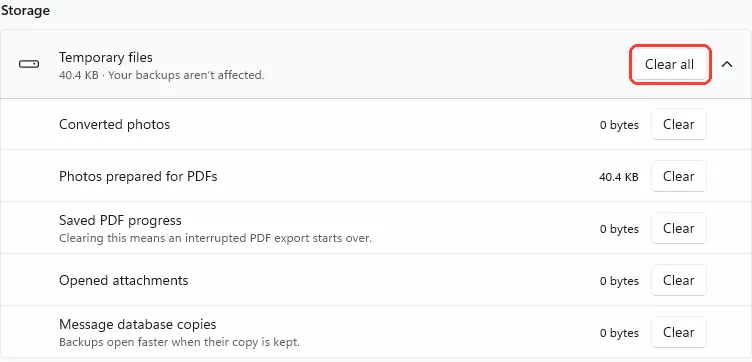
To free up space, click the gear for Settings. Under Temporary files, click Clear all. Your backups aren't affected.
What you need
- ✓TextPort for Windows
Steps
Change the folder
-
Click Backups
It is at the top of TextPort.
-
Click Change folder
It is on the line that shows Where to save or Saving to. Windows asks for a folder.
You can also click the gear, then Change folder under Save new backups to.

-
Click Select Folder
Pick a folder on a drive with room first. New backups save there.

Free up space
-
Click the gear
It is at the top right. Settings opens.
-
Click Clear all
It is under Storage, next to Temporary files. Your backups aren't affected.
Click the arrow to see each kind. Click Clear to clear only that one.
Done
New backups save in your folder, or your temporary files are gone.
Problems
Not enough free space
A backup needs at least 5 GB free to start. Free up space, or click Change folder and pick another drive.
The backup folder isn’t available
Connect the drive. Or click Change folder, or Use default to go back to the first folder.
TextPort can’t save to this folder
Click Change folder. Pick a folder on this PC's own drive.
Choose a folder with a shorter path
Click Change folder. Pick a folder close to the top of the drive.
Couldn’t clear these files
Close apps that might be using them. Then try again.
Some files weren’t cleared
An export or an opening backup is using them. Try again when it is done.
You need much more space.
Old backups use the most space. See Delete old backups.
None of these match.
Email [email protected]. Say which step you were on. Say what you saw. We usually reply within a day.
Questions
-
No. Existing backups stay where they are. TextPort still lists them.
-
TextPort makes a folder named TextPort inside it, unless the folder already has that name.
-
Click Use default. It shows when you use another folder.
-
No messages. Clearing Saved PDF progress means an interrupted PDF export starts over. Clearing Message database copies makes backups open slower the next time.



Start exporting your messages
Available for iPhone, Mac, and Windows. No computer required.
