

How to delete old backups on Windows
Quick answer
In TextPort:
- Click Backups at the top.
- Click … next to the backup under On this PC.
- Click Delete….
- Click Delete backup.
It is gone for good. It does not go to the Recycle Bin. Your iPhone is not changed.
What you need
- ✓TextPort for Windows with at least one backup
Steps
-
Click Backups
It is at the top of TextPort. Your backups show under On this PC.
One backup
-
Click …, then Delete…
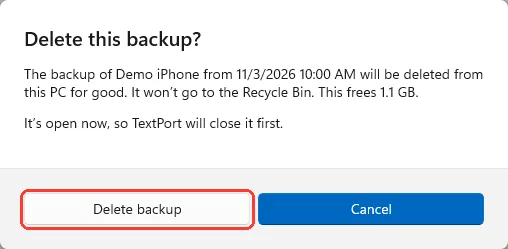
Click … next to the backup (1). Then click Delete… (2). Delete this backup? opens.

-
Click Delete backup
Read how much space it frees first. The backup goes away from the list.
All backups of an iPhone
-
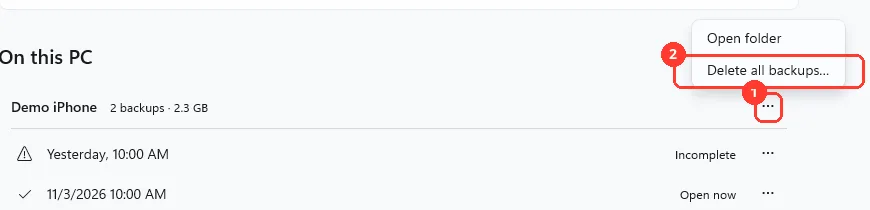
Click …, then Delete all backups…
Click … next to the iPhone's name (1). Then click Delete all backups… (2).
With only one backup, Delete this backup? opens instead.
-
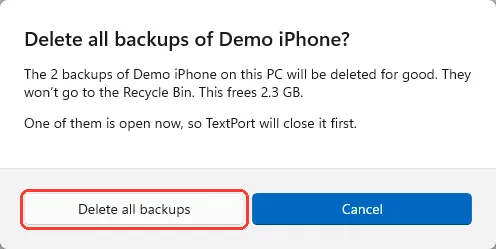
Click Delete all backups
Read how much space it frees first. Every backup of this iPhone goes away.
Incomplete backups
-
Click Delete them
It shows after a backup finishes, when older incomplete backups use space. A window opens.
You can also delete one the normal way. Click … next to it, then Delete….
-
Click Delete backups
Your complete backups stay.
Done
The backup is gone from your PC, and the space is free.
Problems
This is the only complete backup of your iPhone.
Back up the iPhone again first if you still have it. Without the iPhone, these messages can't be recovered from this PC.
I understand these messages can’t be recovered from this PC
You see this when the iPhone isn't plugged in and no other complete backup is left. Check it only if you are sure. Then the delete button works.
Delete… is gray.
An export is reading this backup, or a new backup builds on it. Wait for it to finish.
Couldn’t delete this backup
Nothing was deleted. Click Try again.
Drive not connected
Connect the drive to delete the backup. Or click …, then Remove from list. The files stay on that drive.
There is no Delete… for a backup.
Backups under Made by Apple Devices or iTunes can't be deleted in TextPort. TextPort only reads them. A backup that is still running has no Delete… either.
None of these match.
Email [email protected]. Say which step you were on. Say what you saw. We usually reply within a day.
Questions
-
No. It deletes only the copy on this PC.
-
No. It does not go to the Recycle Bin.
-
TextPort closes it first.
-
Backups of one iPhone can share files. Shared files stay until the last backup that uses them is gone.
-
Click Undo on the Removed from the list notice. It shows for a few seconds.



Start exporting your messages
Available for iPhone, Mac, and Windows. No computer required.
