

How to see when a message was delivered or read on Mac
Quick answer
In a chat in TextPort for Mac, click one of these:
- Delivered or Read under a message you sent.
- The time above the message.
Message details shows the times Messages stored. If a click does nothing, Messages stored no extra times.
What you need
- ✓TextPort for Mac, set up with Messages access
Steps
-
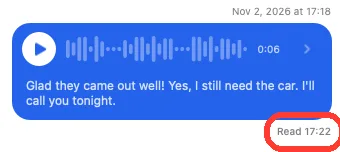
Click Delivered or Read
It is under a message you sent. For a message you got, click the time above it. Message details opens.
-
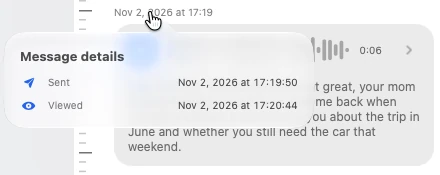
Read the times
A message you sent can show Sent, Delivered, and Read. A message you got can show Sent and Viewed. A voice message can also show Played.
Click outside the box to close it.
Done
You see each time Messages stored for that message, to the second.
Problems
No read event is stored for this Message. This does not prove it was unread.
Messages has no read time for it. It may still have been read.
Clicking the time does nothing.
Messages stored no extra times for that message.
None of these match.
Email [email protected]. Say which step you were on. Say what you saw. We usually reply within a day.
Questions
-
A PDF shows the sent time. It also shows the delivered, read, viewed, or played time when Messages stored one. Spreadsheet and text files show only the sent time.


Start exporting your messages
Available for iPhone, Mac, and Windows. No computer required.
