
How Do You Get Text Messages From a Client? A Guide for Lawyers
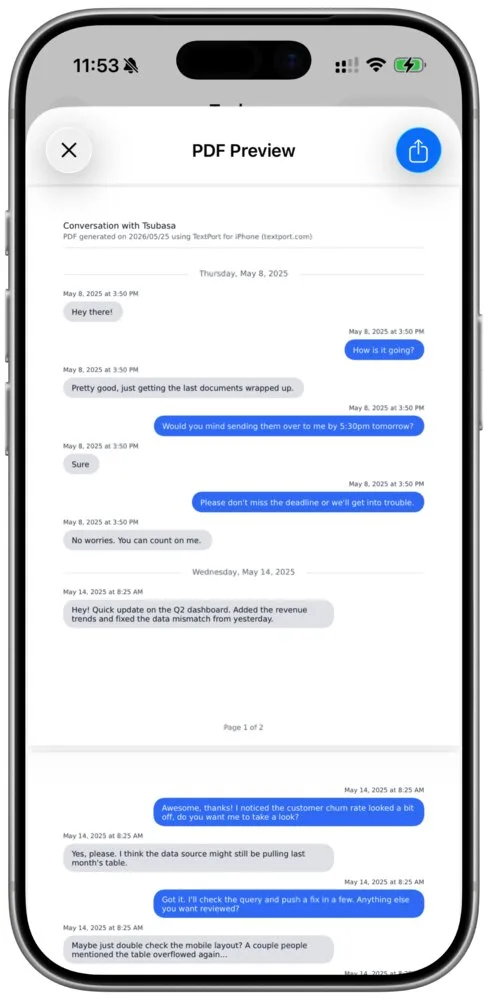
To get text messages from a client, ask in writing for the exact conversations, the date range and a PDF that shows the sender, date and time on every message, and tell them not to delete anything. A client with an iPhone can make that PDF in TextPort without a computer and send you a link to it.
Messages on the iPhone has no export button, so a vague "send me your texts" usually comes back as a handful of screenshots. In TextPort's national survey of 1,081 U.S. adults, 41% of iPhone users who had tried to save a whole conversation found it hard or couldn't do it (351 respondents).
Which route your client takes depends on the app and what they own:
| Your client has | What they use |
|---|---|
| An iPhone, and the texts are in Messages | TextPort's Shortcut on the iPhone (iOS 26.4 or later) |
| An iPhone, and the chat is in WhatsApp | WhatsApp's Export chat, opened in TextPort |
| An iPhone, and the chat is in Messenger, Instagram, Signal or another app | A screen recording or screenshots in TextPort |
| A Mac with years of Messages on it | TextPort for Mac, free, many conversations at once |
| A Windows PC and an iPhone | TextPort for Windows, free, many conversations at once from an iPhone backup |
What should you ask the client to send?
Paste this into your email or portal message and fill in the brackets:
Please send me your messages with [name, and their phone number or email] from [first date] to [last date].
- Send the whole conversation for those dates, both sides, as one file. Please don't send screenshots of single messages.
- Include every app you used to talk to them: Messages, WhatsApp, Messenger, Instagram or anything else. One file per conversation.
- Send it as a PDF [and a CSV].
- Don't delete anything, even messages that don't look helpful.
- On your iPhone, go to Settings, then Apps, then Messages, tap Keep Messages and choose Forever.
- If you have an iPhone, the TextPort app makes the PDF on the phone: TextPort on the App Store.
Please send it by [date].
Don't cut the Keep Messages line. If the setting is 30 days or 1 year, Apple says the iPhone automatically deletes conversations, attachments included, once they're older than that.
How can a client export texts on an iPhone without a computer?
Here's what your client does in TextPort.
- Install TextPort from the App Store on the iPhone that has the messages.
- For Messages (iMessage and SMS): add the conversation through the TextPort Shortcut, which the app installs. This needs iOS 26.4 or later. On an older version, the client can use a screen recording (step 4) or the Mac or Windows app below.
- For WhatsApp: in WhatsApp, tap the person's or group's name, then Export chat, and open the ZIP file it makes in TextPort. WhatsApp leaves view once messages out of its export. The WhatsApp export guide has the details.
- For Messenger, Instagram, Signal, Telegram and other apps: record the screen while scrolling through the chat, or pick screenshots. TextPort reads the messages from them, and the client can edit any name, date or time before exporting, so the file matches what's on their screen.
- Check the people. In Chat Details, each person should have a name and a number or email. The PDF shows whatever is there.
- Export as a PDF, or as a CSV or TXT if you asked for one. The PDF opens with the other people in the chat, by name and number or email, and repeats the sender's number or email above every message.
Your client can import their first three conversations for free. After that, TextPort is a weekly, monthly or annual subscription through the App Store.
How should the client send you the file?
The simplest way is a TextPort link. When the client shares the export with Share Link, you get a textport.com link to the exact file they made. It works for 7 days by default, and the client can turn it off sooner in TextPort under Settings, then Your Data. Download the file when the link arrives so you have your own copy.
If your firm uses a client portal or secure upload, the client can save the PDF to Files and upload it there instead. Email works for short conversations.
What should you check when the file arrives?
Check the file against what you asked for, then go back to the client for anything missing:
- Dates. The first and last messages fall inside the range you asked for, and there's no gap you can't explain. A gap may just mean nobody texted that week, so ask rather than assume.
- People. Everyone in the chat has a number or email next to their name. If someone shows only a name, the client adds the number in Chat Details and exports again.
- Both sides. You can see the client's messages and the other person's.
- Every app. You have one file for each conversation and each app you listed.
What the messages mean for the case, and how they get admitted as evidence, is your call. If your client wants background reading, see can text messages be used in court and text messages as legal evidence.
What does this look like in a custody case?
Say you represent a parent in a custody matter. The texts that matter are with the other parent from January to June, in Messages, plus a WhatsApp group the two of them share with a grandparent.
You send the request above with those names and dates. Two days later the client sends two TextPort links: one PDF for the Messages thread and one for the WhatsApp group. You download both. The Messages PDF starts in January and ends in June, and the other parent's phone number sits next to their name on every message. In the WhatsApp PDF, the grandparent shows only as "Grandma" with no number. You reply asking the client to add her number in Chat Details and export that one again. The second link arrives the same day, and the file now matches the request.
What if the client needs years of messages, or has a computer?
For a long history, the free desktop apps export many conversations at once:
- On a Mac: TextPort for Mac reads the Messages already on that Mac and exports PDF, CSV or TXT. No account, macOS 14.6 or later.
- On a Windows PC: TextPort for Windows reads an iPhone backup it makes, or one already made with Apple Devices or iTunes. No account.
Decipher TextMessage and iMazing also work from a computer: Decipher's guide for lawyers starts by backing up the iPhone to the computer, and iMazing's business plan emails your client a license code to run the software on their own Mac or PC. Neither helps a client who only has a phone. For more options, see 6 apps to print text messages for court.
Frequently asked questions
-
TextPort, on an iPhone. It turns a conversation from Messages, WhatsApp, Messenger, Instagram and other chat apps into a PDF you can print, with the sender, date and time above every message, and it needs no computer. Desktop tools such as Decipher TextMessage and iMazing need a Mac or PC. Whether a court accepts the printout depends on your case; this guide explains how text messages are used as evidence.
-
Print from one PDF of the whole conversation for the dates that matter, not a stack of screenshots, and keep the original thread on the phone. TextPort can print straight from the iPhone, or you can print the PDF from any computer. The court export guide walks through it on an iPhone.
-
Ask them to check Recently Deleted in Messages right away: Apple lets you recover deleted texts on an iPhone for up to 30 days. The thread may also still be on the other person's phone.
-
No. TextPort is a software tool, not a law firm, certification service or forensic service. It makes a clean, dated PDF, CSV or TXT of the conversation the client chose and reviewed. If the other side says the messages are fake, whether to bring in a digital forensics examiner is your call.

Start exporting your messages
Available for iPhone, Mac, and Windows. No computer required.