

How to open an Apple Devices or iTunes backup on Windows
Quick answer
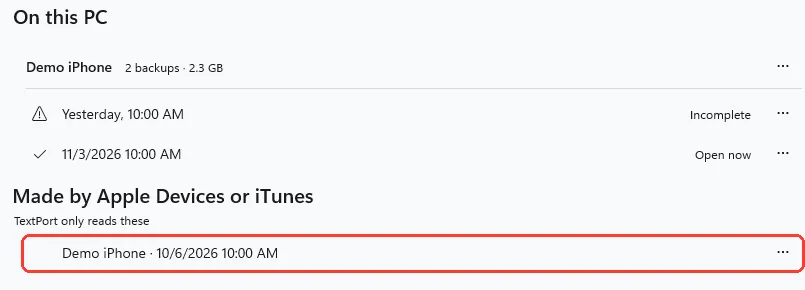
In TextPort:
- Click Backups at the top.
- Click the backup under Made by Apple Devices or iTunes.
Messages opens with that backup. You do not need the iPhone. The first time you open TextPort, click Read that backup instead, then the backup.
What you need
- ✓TextPort for Windows
- ✓A backup that Apple Devices or iTunes made on this PC, without encryption
Steps
Backups page
-
Click Backups
It is at the top of TextPort. The backups show under Made by Apple Devices or iTunes.
-
Click the backup
It shows the iPhone's name and the date. Messages opens.
First time
-
Click Read that backup instead
It is at the bottom of Get your iPhone messages on this PC. Made by Apple Devices or iTunes shows.
You see this only when TextPort finds such a backup on this PC.
-
Click the backup
It shows the iPhone's name and the date. Messages opens.
On Messages
-
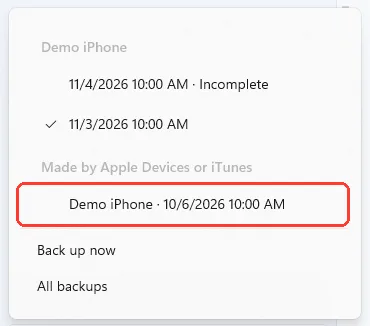
Click the backup name
It is at the bottom of the conversation list. A list of backups opens.
You can also press Ctrl+O.
-
Click the backup
It is under Made by Apple Devices or iTunes. Its conversations open.
Done
The backup is open in TextPort. Click a conversation to read it or export it.
Problems
Encrypted, can’t be opened
This backup was made with encryption on. TextPort can't read it. Back up the iPhone with TextPort instead.
There is no Made by Apple Devices or iTunes list.
TextPort found no such backup on this PC. If the backup is on another computer, copy its folder to this PC. See the question below for where it goes.
No conversations in this backup
This backup has no messages. Back up your iPhone with TextPort.
Couldn’t open this backup
The screen says why. Click Try again, or click Choose another backup.
The newest messages are missing.
The backup stops at the date it was made. To get newer messages, back up your iPhone with TextPort.
None of these match.
Email [email protected]. Say which step you were on. Say what you saw. We usually reply within a day.
Questions
-
In
%APPDATA%\Apple Computer\MobileSync\Backupand%USERPROFILE%\Apple\MobileSync\Backup. -
No. TextPort only reads these backups.
-
No. The backup is already on your PC.
-
Yes. Open a conversation and click Export.
-
No. Its menu has Open, Export all conversations… and Show in folder. Apple Devices or iTunes manages the backup.
Next guides
-
 How to back up your iPhone to your PC with TextPort
You will have a backup of your iPhone on your PC, and your messages open in TextPort.
-
 How to find your iPhone backups on your PC
You will see the folder of an iPhone backup in File Explorer.
-
 How to export a conversation to PDF, CSV, or TXT on Windows
You will get a file of one conversation on your PC, as a PDF, a spreadsheet, or plain text.

Start exporting your messages
Available for iPhone, Mac, and Windows. No computer required.
