
Are Screenshots of Text Messages Admissible in Court?
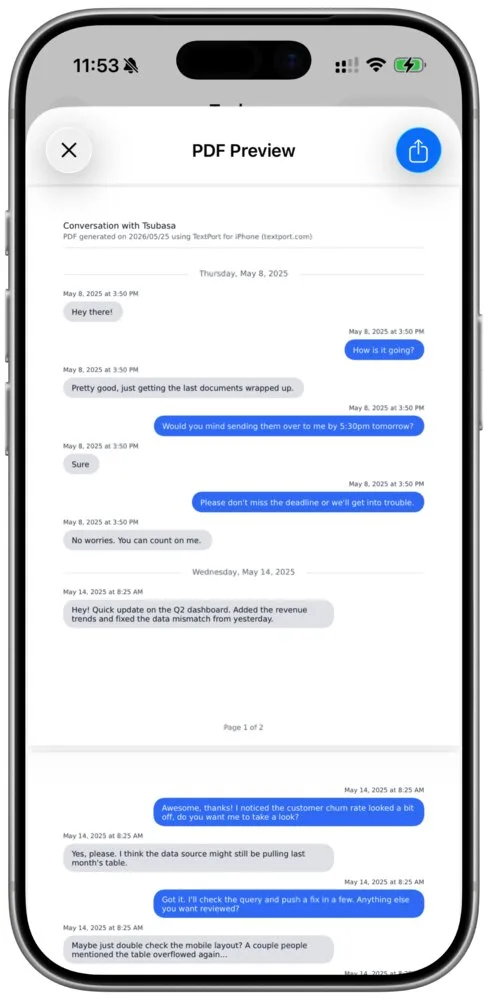
Yes. Screenshots of text messages are regularly used as evidence in U.S. courts, in custody hearings, small claims, protective-order cases and more. A judge will usually accept them once someone who was in the conversation, often you, says they show it accurately. What weakens a screenshot is what's missing from it: who sent each message, when, and the rest of the thread.
Most people already have a few. In TextPort's Texting as Evidence 2026 survey of 1,081 U.S. adults, 81% said they had screenshotted a text or DM because they might need it as proof. Saving a whole conversation is harder. Of the people who had tried, 32% found it hard or couldn't do it, and among people who took the survey on an iPhone it was 41%.
This is general information, not legal advice. Your court and your lawyer have the final word.
How to take screenshots that hold up on an iPhone
A screenshot proves only what's inside its frame. Set up the screen first, so every image shows who wrote each message, when, and what came before it. (For iMessage and SMS there's also a way that needs no screenshots at all. It's in the last section.)
- Show the time of every message. In Messages, iPhone shows a time only now and then, above a group of messages. Apple's tip: "Swipe left on the message bubble to see timestamps for all messages in the conversation." The times show only while you hold the swipe, so drag a bubble to the left, keep your finger there, and take the screenshot with your other hand. The swipe shows only the time of day, so keep a date header (the gray line with the day) in each screenshot too. To take one, press the side button and the volume up button together (or the side or top button and the Home button on an iPhone with a Home button).
- Show who you were talking to. A name you saved in your contacts proves nothing by itself. Tap the person's name at the top of the conversation and take a screenshot of the contact details that open, with their phone number or email in view.
- Capture the whole exchange, in order. Include your messages and theirs. Scroll a little at a time so each screenshot overlaps the one before it, and there's no gap anyone can point to.
- Leave the screenshots as they are. iOS 26 opens each new screenshot with crop and Markup tools. Skip them. If you already cropped or drew on one, open it in Photos, tap More, then Revert to Original.
- Keep the originals. Leave the conversation on your phone and the screenshots in Photos. Don't delete the thread or replace the phone while the case is open.
- Write down how you know it's them. Their number, details only they would know, and how the messages fit what happened. TexasLawHelp's sample script starts with exactly that: "I know that the text message is from __ (person) because it came from his/her phone number."
What a judge needs before a screenshot counts
Each state has its own rules of evidence, so the exact wording depends on your court. The Federal Rules of Evidence show the basic idea.
Someone has to say it's genuine. Lawyers call this authentication. Rule 901(a) asks only for enough evidence to show the screenshot is what you say it is. The usual way is the testimony of a witness with knowledge: you, saying these are the messages you sent and received. The same rule lets the contents and circumstances help, such as the phone number, details only the sender would know, and replies that only make sense as answers to yours.
Courts have accepted this from a witness who was in the conversation. In People v. Rodriguez (2022), New York's highest court held that the victim could authenticate screenshots of her texts with the defendant even though someone else had taken them, by testifying that they accurately showed the conversation.
The trouble starts when nothing ties the messages to the person. In Griffin v. State (2011), Maryland's highest court ordered a new trial because printouts from a MySpace profile had been admitted when, in the court's words, the state "identified only the date of birth of the creator and her visage in a photograph on the site." The court's worry was that "anyone can create a fictitious account and masquerade under another person's name." A phone number on screen and messages only that person would write make that link.
A printout can count as the original. For electronic information, Rule 1001(d) says a printout counts as an original "if it accurately reflects the information." And under Rule 1003, a copy can be used like the original unless someone raises a real question about whether the original is genuine. If anyone does question a screenshot, the conversation still on your phone is what it gets checked against.
Their messages usually aren't hearsay. Hearsay is a statement made outside court that's offered to prove it's true, and it's often kept out. Under Rule 801(d)(2), the other person's own messages, offered against them, don't count as hearsay. Your own messages are harder, and Can Text Messages Be Used in Court? walks through when they come in.
How courts want screenshots handed in
Self-help pages written by courts and legal aid groups say much the same thing. Get the messages off the phone, print them, label each one as an exhibit (a numbered piece of evidence), and bring copies.
| Source | What it tells you to do |
|---|---|
| TexasLawHelp | "Take screen shots of the exchange you want to use as evidence and print those photographs. Label each separate exchange as an Exhibit." |
| California Courts Self-Help Guide (restraining orders) | Print texts and make 3 copies of each: one for you, one for the judge, one for the other side. |
| LawHelpMN (protection orders) | Get texts off your phone and print them. Bring 3 copies of your evidence to the hearing. |
| Fresno County Superior Court (one courtroom's exhibit rules) | "The Judge cannot consider as evidence any text messages, photographs or recordings on your cell phone." |
Your court may want something more, such as exhibit stickers, a page limit or an exhibit list. Check its self-help page or ask the clerk early. For a full walk-through of printing a conversation for a hearing, see how to print text messages for court.
What to do when screenshots get challenged
The other side can object to screenshots. Here are four common objections, and what answers each one.
- "They're fake or edited." You testify to what you sent and received, and the original conversation on your phone backs you up. Screenshots you never cropped or marked up are easier to defend. An article in an American Bar Association newsletter notes that in Delaware, the objecting side has to offer more than a guess that a screenshot was changed.
- "That wasn't me." This is the Griffin problem. The phone number, details only that person knew, and how the messages fit the events tie them to the sender.
- "You left out the rest." Under Rule 106, if you show part of a conversation, the other side can require any other part "that in fairness ought to be considered at the same time." A complete thread takes that argument away.
- "The original is gone." This is the one you can't answer later, so prevent it. The same ABA article finds courts "tend to be lenient in allowing screenshots," and names two situations where they're kept out: the person offering them got rid of the original, or the screenshot was shown to be changed. In one case the person had deleted their Facebook account. In another, they had thrown away the phone. Keep the conversation and the phone until the case is over.
Skip the stack of screenshots when you can
Which way you bring a conversation into TextPort depends on the app it's in.
For iMessage and SMS, you don't need screenshots at all. TextPort imports the conversation itself through the TextPort Shortcut (iOS 26.4 or later), with each message's own date and time and the photos. WhatsApp works the same way from WhatsApp's own Export Chat file. Both are exact copies of the conversation, with nothing to transcribe.
For Messenger, Instagram, Signal, Snapchat and most other apps, screenshots or a screen recording are the way in. TextPort reads the names, messages, dates and times in them on its servers. It can only use the dates and times your screenshots show, which is one more reason to hold the swipe while you take them. Check the imported chat against your screenshots and fix anything that was misread before you export. The guide to preparing messages for court shows where.
Either way, the PDF puts the sender's name above every message, with the date and time wherever the chat has one, numbers every page, and can add each person's phone number next to their name. Print it, save it or send it to your lawyer, and keep the screenshots too. They're the originals the PDF came from. You can import your first three chats for free.
Frequently asked questions
-
A recording of you scrolling through the conversation shows the whole thread in one file, with no gaps between images, so it's harder to say something was left out. It still needs someone who was in the conversation to say it shows the messages accurately. TextPort can turn either one into a PDF.
-
Usually not. A forensic examination of the phone is for cases where the other side seriously disputes that the messages are real, for example a claim that they were made up or that someone else used the phone. If that's your case, talk to a lawyer before the hearing.

Start exporting your messages
Available for iPhone, Mac, and Windows. No computer required.