

How to fix “TextPort can’t read your Messages” on Mac
Quick answer
Match the title TextPort shows:
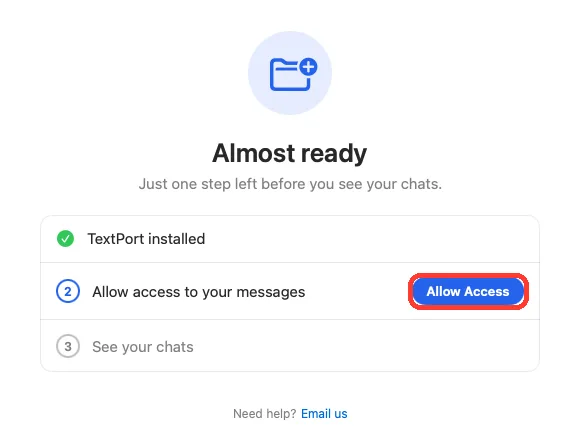
- Almost ready: click Allow Access or Choose Again, then Choose Folder.
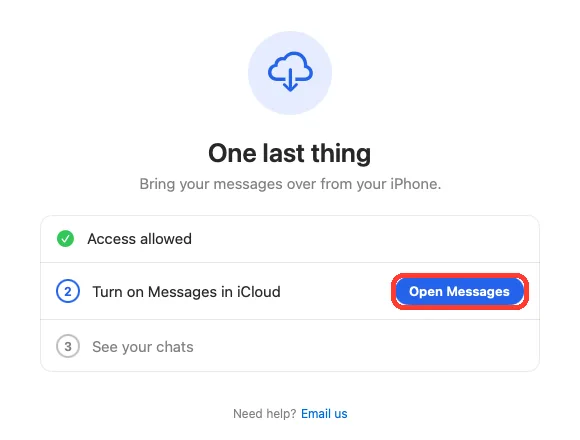
- One last thing: click Open Messages and turn on Messages in iCloud.
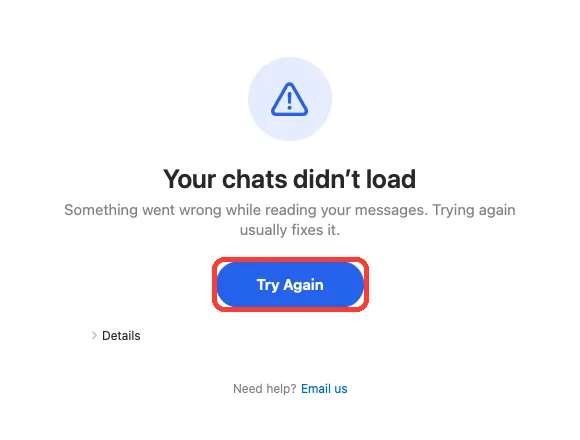
- Your chats didn’t load: click Try Again.
- On iPhone: How to fix a stuck or failed Shortcut import
- On Windows: How to fix an iPhone not showing up on Windows
What you need
- ✓TextPort for Mac
- ✓Messages signed in on the same Mac
Steps
Almost ready
-
Click Allow Access
It is on the step Allow access to your messages. A folder picker opens.
If the step says Choose the folder called Messages, click Choose Again.
-
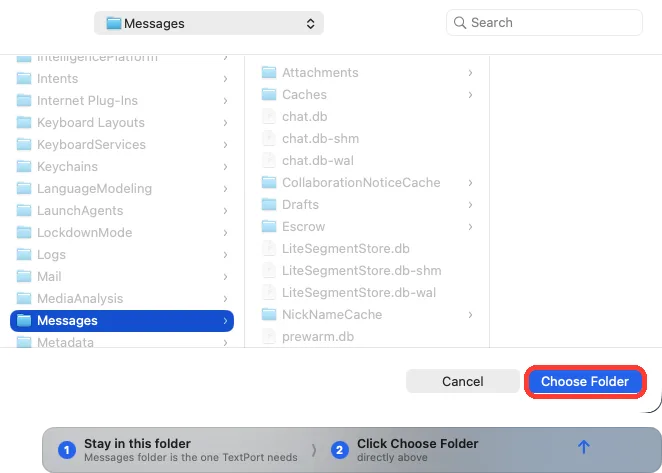
Click Choose Folder
The picker is already in the Messages folder. Do not open anything in it.
If the picker shows your Library folder, click Messages once first.
One last thing
-
Click Open Messages
TextPort can read the folder, but it has no chats. Messages opens.
-
Turn on Messages in iCloud
In Messages, open Settings, then iMessage. Check Enable Messages in iCloud.
-
Wait for your chats
Keep Messages open until your chats show in it. Then go back to TextPort.
Your chats didn’t load
-
Click Try Again
TextPort reads your messages again. Your chats show.
If you see the same screen, quit TextPort and open it again.
Done
TextPort shows your chats in the list on the left, with photos and names.
Problems
A chat shows Show photos and attachments.
Click Choose Attachments Folder… on that card. In the picker, click Choose Attachments. Closed the card? See how to show photos and names.
A chat shows Show names instead of numbers.
Click Allow Access on that card. If it says Open System Settings…, click it and turn on Contacts for TextPort. Closed the card? See how to show photos and names.
Your chats didn’t load comes back after Try Again.
Restart your Mac. If it still shows, click Email us on that screen. It adds the details we need.
Chats from your iPhone are missing.
TextPort shows only chats saved on this Mac. Turn on Messages in iCloud on your iPhone and your Mac. Wait for the chats to sync.
Almost ready says TextPort can no longer open the folder you chose before.
Click Allow Access. In the picker, click Choose Folder without opening anything. Do not pick a folder inside Messages.
The picker opened in a different folder.
Press Command-Shift-G. Type ~/Library/Messages and press Return. Then click Choose Folder.
None of these match.
Email [email protected]. Say which step you were on. Say what you saw. We usually reply within a day.
Questions
-
macOS can drop the folder access TextPort saved. Picking the folder again fixes it.
-
No. TextPort does not use Full Disk Access. It only needs the folder you pick.
-
No. It reads Messages on this Mac. To get iPhone chats on the Mac, turn on Messages in iCloud on both.
Next guides
-
 How to install TextPort for Mac and give it Messages access
You will have TextPort for Mac open, showing every chat saved in Messages on that Mac.
How to install TextPort for Mac and give it Messages access
You will have TextPort for Mac open, showing every chat saved in Messages on that Mac.
-
 How to show photos and names in TextPort for Mac
You will see photos and files in your chats, and names instead of numbers.
How to show photos and names in TextPort for Mac
You will see photos and files in your chats, and names instead of numbers.
-
 How to export one chat to PDF, CSV, or TXT on Mac
You will get a file of one chat on your Mac, as a PDF, a spreadsheet, or plain text.
How to export one chat to PDF, CSV, or TXT on Mac
You will get a file of one chat on your Mac, as a PDF, a spreadsheet, or plain text.

Start exporting your messages
Available for iPhone, Mac, and Windows. No computer required.