
How to print a chat from your Mac
Quick answer
In TextPort for Mac:
- Click the chat in the list on the left.
- Press Command-P, or choose File › Print Conversation….
- Pick your printer next to Printer.
- Click Print.
- On iPhone: How to print a chat from your iPhone
- On Windows: How to print text messages from a Windows PC
What you need
- ✓TextPort for Mac, set up with Messages access
- ✓A printer set up on your Mac
Steps
-
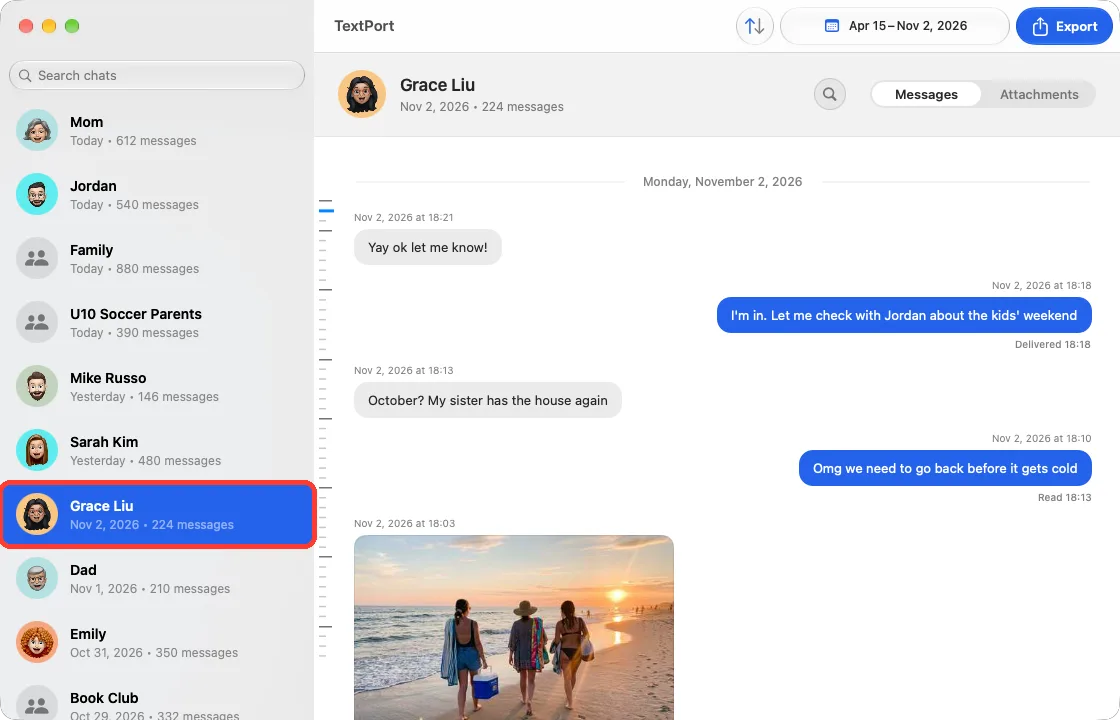
Click the chat
It is in the list on the left. Its messages show on the right.
-
Press Command-P
Or choose File › Print Conversation…. TextPort makes the pages. The Print window opens.
-
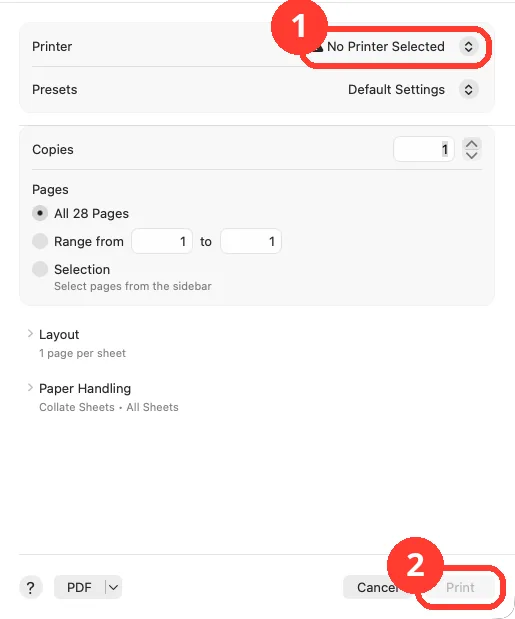
Pick your printer
Click the menu next to Printer (1). Pick your printer. Print (2) turns blue.
-
Click Print
It is at the bottom right. Your printer starts.
Done
Your chat is printed. Each message shows who sent it and when.
Problems
The printout has every date.
Printing always uses the whole chat. For some dates, filter the chat, then click Export in the toolbar and PDF. Print that PDF.
Print is gray.
No printer is picked. Click the menu next to Printer. If no printer is listed, add one in System Settings › Printers & Scanners.
Couldn’t Print Conversation
Click OK and try again. Or export a PDF and print that. See how to export a chat.
You picked many chats, but only one prints.
TextPort prints one chat at a time. To print many, export them as PDFs and print each one.
Photos show as placeholders.
TextPort cannot read the Attachments folder. See how to show photos, then print again.
None of these match.
Email [email protected]. Say which step you were on. Say what you saw. We usually reply within a day.
Questions
-
Yes. In the Print window, click Range from and type the page numbers.
-
Yes. Click the PDF button in the Print window. Or export a PDF from TextPort.
-
The same order as the chat. Click the Message Order button in the toolbar to change it.
Next guides
-
 How to export one chat to PDF, CSV, or TXT on Mac
You will get a file of one chat on your Mac, as a PDF, a spreadsheet, or plain text.
-
 How to filter a chat by date on Mac
You will see only the messages from the days you pick.
-
 How to prepare text messages for court
You will have a PDF of the chat that shows who said what, and when, with phone numbers.

Start exporting your messages
Available for iPhone, Mac, and Windows. No computer required.
