

How to see who is in a group conversation in TextPort for Windows
Quick answer
In a group conversation:
- Click People at the top.
- Read the names and numbers.
- Click Copy all to copy the list.
What you need
- ✓TextPort for Windows, with a group conversation open
Steps
-
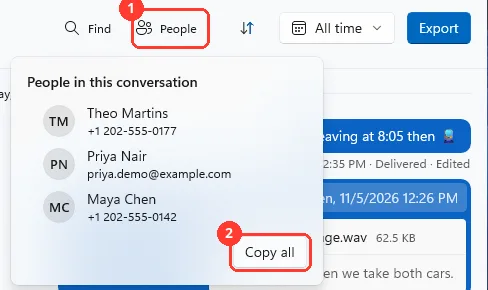
Click People
It is at the top of a group conversation (1). People in this conversation opens.
-
Click Copy all
It copies every name with its number or email (2). Paste the list in any app.
Done
You know who is in the group. The list is copied if you clicked Copy all.
Problems
There is no People button.
People shows only in group conversations. In a one-to-one conversation the number or email is under the name.
A person shows a number, not a name.
The backup has no contact name for that number. TextPort shows what the backup holds.
None of these match.
Email [email protected]. Say which step you were on. Say what you saw. We usually reply within a day.
Questions
-
One line for each person: the name, then the number or email.



Start exporting your messages
Available for iPhone, Mac, and Windows. No computer required.