

How to fix a stuck or stopped backup on Windows
Your iPhone backup will finish, or you will know what to send to support.
What you need
- ✓TextPort for Windows
- ✓Your iPhone and its USB cable
Steps
-
1
Go to Backups
Click Backups at the top of TextPort. Or click See what happened if TextPort says The last backup didn’t finish.

-
2
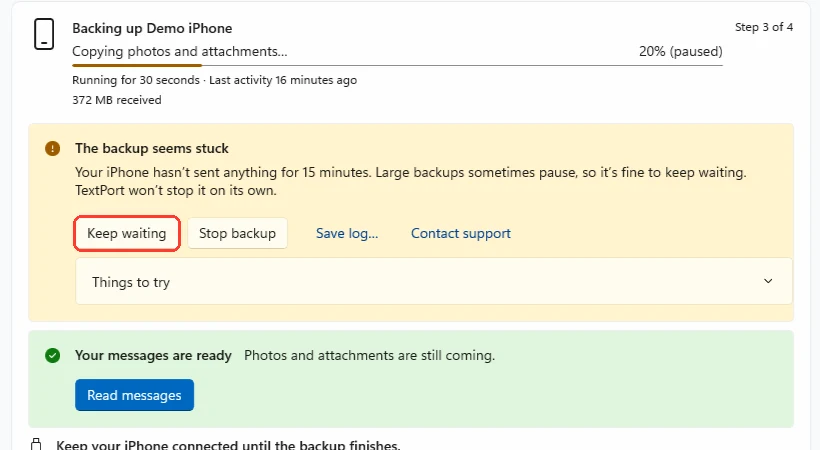
Click Keep waiting if it says the backup seems stuck
Large backups sometimes pause for a while. TextPort won’t stop the backup on its own. Click Keep waiting.
-
3
Check your iPhone
Make sure it is still plugged in and unlocked. Unlock it if it asks for the passcode. The backup goes on by itself.
-
4
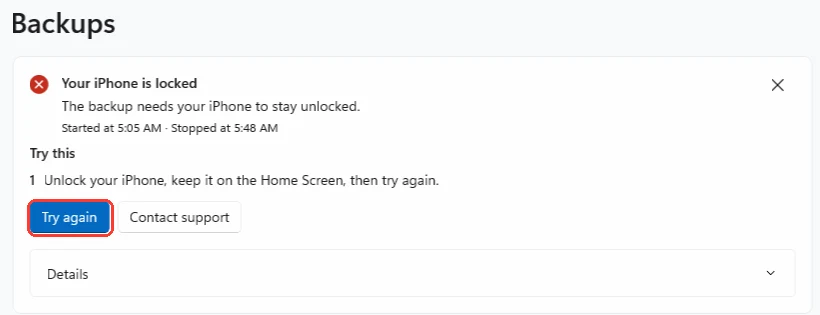
Read the Try this list if the backup stopped
When a backup fails, TextPort says why. Under Try this, it lists what to do. Do those steps first.
-
5
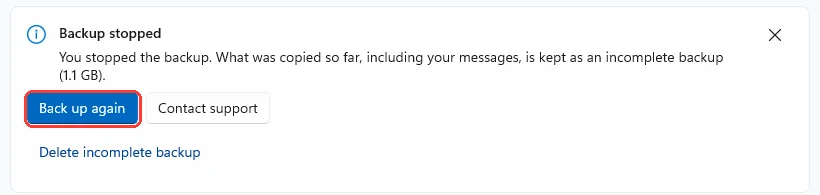
Click Continue backup or Try again
If you see Continue backup, click it. It keeps what was already copied. Otherwise click Try again or Back up again.
-
6
Click Contact support if it fails again
Click Contact support on the card. Type your email and click Send. TextPort sends the backup logs with your message.
Done
Your backup finishes and opens on the Messages page. Or support has your logs and can help.
Tips
-
Your messages are copied first. You can often read them while photos and files are still coming.
-
The percent can stay still for a long time. Your iPhone sends photos and app data that TextPort skips, and they still have to pass through.
-
If backups keep stopping, save them to a folder on this PC’s own drive, not to OneDrive or a network drive.
-
Don’t click Delete incomplete backup unless you want to start over. A stopped backup can often be continued.
Questions
-
Only if you must unplug your iPhone. A first backup that stops has to start over, and your iPhone sends everything again.
-
Click Details on the card to see the error code. Click Contact support and we will look at the log with you.
-
Apple suggests updating your security software, or turning it off for a while, if backups never finish. Turn it back on when the backup is done.
-
A first backup can take an hour or more on a large iPhone. Later backups copy only what changed, so they are faster.
Next guides
-
 How to back up your iPhone to your PC with TextPort
You will have a backup of your iPhone on your PC, and your messages open in TextPort.
How to back up your iPhone to your PC with TextPort
You will have a backup of your iPhone on your PC, and your messages open in TextPort.
-
 How to fix an iPhone not showing up on Windows
Your iPhone will show up in TextPort for Windows, so you can back it up.
How to fix an iPhone not showing up on Windows
Your iPhone will show up in TextPort for Windows, so you can back it up.
-
 How to find your iPhone backups on your PC
You will see the folder of an iPhone backup in File Explorer.
How to find your iPhone backups on your PC
You will see the folder of an iPhone backup in File Explorer.

Start exporting your messages
Available for iPhone, Mac, and Windows. No computer required.