
How to File an EEOC Complaint Online, Step by Step
To file an EEOC complaint online, open the EEOC Public Portal, answer five screening questions, sign in with Login.gov and submit an inquiry. Then book an intake interview in the EEOC Scheduler, do the interview, and sign the charge the EEOC drafts for you. The deadline is 180 days after the discrimination, or 300 where a state or local agency enforces a similar law; the portal gave 300 for California, Texas, Florida, New York and Illinois.
Texts and chat messages often hold the proof: what a supervisor said and when, the reason you were given for a firing or a cut in hours, and what changed after you complained. They also carry the dates your deadline turns on.
This is general information, not legal advice, and deadlines differ by state. The EEOC answers questions at 1-800-669-4000, and your local legal aid office can help for free.
How to file an EEOC complaint online, step by step
The EEOC calls a complaint a charge, "a signed statement asserting that an employer, union or labor organization engaged in employment discrimination." Except under the Equal Pay Act, you need one before you can sue under the laws the EEOC enforces. The portal's five stages are Assessment, Inquiry, Schedule Interview, More Details and File Charge.
- Answer the assessment. The portal asks the type of employer, the date, the reason (race, sex, age, disability, retaliation and others), the state, and sometimes pay or the number of employees. No account is needed, and nothing is saved unless you go on to submit an inquiry. For the date, enter the most recent act; for ongoing harassment, the last incident. The result shows your deadline and warns: "Submitting an inquiry is not the same as filing a charge of discrimination."
- Sign in with Login.gov and submit the inquiry. Since March 30, 2026, the portal requires a Login.gov account. If you used the portal before, use the same email (EEOC FAQ). The inquiry asks what was done to you, the employer's contact details, where you worked (for remote work, where you physically worked) and any earlier filing. Write down the inquiry number. Then confirm the Preservation of Evidence screen: until you do, the portal won't let you take any further action on the inquiry (EEOC portal guide).
- Book the interview in the EEOC Scheduler. It's a separate site with its own user ID and password, "not the same as the Login.gov account you used to login to the EEOC Public Portal." After the 5-day email reminder, confirm no later than 3 days before the appointment, or it's cancelled. An inquiry isn't a charge, so the wait counts against your deadline; if it's close, call 1-800-669-4000 for an immediate interview. Don't let the inquiry sit: after 60 days with no activity and no interview booked, when more than 60 days remain before your deadline, the EEOC emails to ask whether you want to go on, and closes the inquiry if you don't answer within 30 days (portal guide).
- Export the text messages. If a supervisor or coworker texted you, save the conversation for the dates involved as a PDF, with the date and time on every message. TextPort does this on an iPhone, with no computer. Do it before the interview, so you can give exact dates and words. For Slack or Teams, follow your employer's rules; see exporting Slack conversations and exporting Teams chats.
- Fill in More Details before the lock. Four optional questions cover things like the reason you were given, how others in a similar situation were treated, who will back you up (with an email or phone number), and anything else. You can edit them until the EEOC locks the inquiry, typically "24-48 hours before the scheduled interview".
- Do the interview, by phone, by video or in person at one of 53 EEOC offices, with your notes and exported messages in front of you. The EEOC says "an interview helps individuals make more informed decisions about whether to file a charge."
- Review, correct and sign the charge. If your claim is covered, the EEOC writes the Charge of Discrimination and emails you when it's in the portal. Download it and read every line. Choose Yes to recommend changes (as often as needed) or Do Not File. When it's right, check the box confirming it's true and correct, sign electronically and select File Charge (portal guide). A signed copy is emailed to you, and the EEOC notifies your employer within 10 days, with your name.
- Upload your evidence. After filing, the My Documents section of your charge takes files (portal guide). Upload each exported conversation as a PDF, a format the portal accepts. Uploads can't be deleted, so check each PDF first; the upload box turns away files over 100 MB.
You can also file in person at an EEOC office, or mail a signed letter with your contact details, the employer's, its number of employees, what happened, when, and why you believe it was discriminatory (EEOC). A phone call starts the process but files nothing.
Who can file an EEOC complaint
Employees, job applicants and former employees can file if the employer is big enough for the law involved. Independent contractors aren't covered (EEOC).
| Law | Covers | Employer size |
|---|---|---|
| Title VII | Race, color, religion, sex, national origin | 15 or more employees |
| Americans with Disabilities Act | Disability | 15 or more |
| Pregnant Workers Fairness Act | Pregnancy accommodations | 15 or more |
| Genetic Information Nondiscrimination Act | Genetic information | 15 or more |
| Age Discrimination in Employment Act | Age 40 and older | 20 or more |
| Equal Pay Act | Sex-based pay differences | Virtually all employers |
For the laws with an employee minimum, the employer must have that many employees on each working day in 20 or more calendar weeks of this year or last (42 U.S.C. § 2000e, § 12111, 29 U.S.C. § 630). For age discrimination, a state or local government is covered "no matter how many employees it has." Sources: EEOC pages on equal pay, genetic information and the PWFA.
Someone else can file on your behalf to protect your identity, though the EEOC warns it may still be hard to hide (EEOC).
Federal employees instead contact their agency's EEO counselor within 45 days (29 C.F.R. § 1614.105), then file a formal complaint within 15 days of the counselor's notice. An August 2026 EEOC proposal would replace counseling with direct filing within 60 days; as of mid-November 2026 it wasn't final.
Your deadline: 180 or 300 days
"The 180 calendar day filing deadline is extended to 300 calendar days if a state or local agency enforces a law that prohibits employment discrimination on the same basis." For age discrimination, only a state law enforced by a state agency extends it.
| State | EEOC deadline (portal) | State agency | State agency deadline |
|---|---|---|---|
| California | 300 days | Civil Rights Department | 3 years from when you were last harmed |
| Texas | 300 days | Texas Workforce Commission | 180 days; 300 for sexual harassment |
| Florida | 300 days | Commission on Human Relations | 365 days |
| New York | 300 days | Division of Human Rights | 3 years from the most recent incident (acts on or after Feb. 15, 2024) |
| Illinois | 300 days | Department of Human Rights | 2 years for most cases |
The EEOC column is the deadline the portal gives in these states for sex discrimination at a business; for Alabama it gives 180 days, and age claims can differ. State sources: California CRD, Texas Labor Code § 21.202, Florida Statutes § 760.11, New York DHR, Illinois IDHR.
A longer state deadline doesn't stretch the federal one. In Florida, to keep federal rights through dual filing, you "generally must have filed your original charge within 300 days of the discriminatory act."
- Each act usually has its own clock. If you were demoted and fired a year later, a charge filed after the firing may be too late for the demotion (EEOC).
- Ongoing harassment counts from the last incident, and earlier incidents still count, for the EEOC and for courts under National Railroad Passenger Corp. v. Morgan (2002).
- HR complaints and union grievances generally don't pause the clock. Weekends count; a deadline on a weekend or holiday moves to the next business day.
- Pay: under Title VII, each paycheck issued under a discriminatory pay decision restarts the clock (42 U.S.C. § 2000e-5). Equal Pay Act claims can go straight to court within two years of the last discriminatory paycheck, three if willful, and an EEOC charge doesn't extend that.
- 60 days or fewer left: the portal gives special directions for filing fast (EEOC), or call 1-800-669-4000 to ask for an immediate interview. Walk-ins with imminent deadlines are seen first.
- Past your deadline: the portal warns you only when the date is more than 300 days ago, so in a 180-day state, check the deadline its result gives you. It lets you continue, and you can still file in person, though the EEOC may not be able to help.
Filing with your state agency too
Worksharing agreements usually make one filing count twice: a charge filed with the EEOC or a state or local agency is "automatically filed with the other agency." Some agencies have stopped. New York City's Commission on Human Rights "no longer automatically cross-files claims of employment discrimination with the EEOC", and it won't take a complaint already filed on the same facts with the EEOC, another agency or a court, so in New York City, ask the Commission how to keep both options before you file anywhere. Minnesota's Department of Human Rights stopped on October 1, 2025. TexasLawHelp and Florida's commission describe sharing charges with the EEOC; whichever agency you file with, ask whether your charge will reach the EEOC.
If your charge is transferred to a state or local agency, you can no longer see it or upload documents in the EEOC portal. For reporting harassment to HR first, see how to report harassment at work.
What happens after you file an EEOC complaint
- Your employer is notified within 10 days, and the notice includes your name (EEOC). Charges aren't made public.
- The EEOC may dismiss it early if the laws don't apply, the charge is late, or "the EEOC decides to limit its investigation".
- You may be invited to mediate. It's voluntary and free, and it takes less than 3 months on average, against 10 months or more for an investigation (EEOC). In fiscal year 2025, 7,929 of 11,346 EEOC mediations (70%) were resolved (EEOC performance report). A Yes or No in the portal can't be undone there, and what's said in mediation can't be used in the investigation.
- The employer answers. If there's no mediation, or it fails, the EEOC usually asks the employer for a position statement. You can request a copy and download it in the portal. The September 2026 portal guide asks for your response "within 20 days from the date you receive it"; the EEOC's after-filing page says 30. Plan on 20, check the cover letter, and confirm any extension with the investigator by email. The employer doesn't see your response during the investigation. Point to "the specific documents and evidence supporting your allegations", with dates.
- The investigation takes about 10 months on average. New events can be added by amending the charge, within the same deadlines.
Of the 90,744 charges resolved in fiscal year 2025, 63.4% ended with no reasonable cause found, and 17.5% in a settlement, a withdrawal with benefits or a reasonable-cause finding (EEOC data).
The Notice of Right to Sue
If the EEOC finds a likely violation, it first tries to settle with the employer, then decides whether to sue. If it can't determine that the law was violated, or decides not to sue, you get a Notice of Right to Sue. "Once you receive a Notice of Right to Sue, you must file your lawsuit within 90 days." Once 180 days have passed since you filed, the EEOC must give you the notice if you ask, by uploading a request in the portal. Asking usually ends the investigation: "If you want the EEOC to continue investigating your charge, don't request a Notice of Right to Sue." Age claims don't need the notice: you can sue once 60 days have passed since you filed, and no later than 90 days after the EEOC tells you its investigation is over.
Count the 90 days from the day the EEOC's email arrives. The EEOC emails you when the notice is in the portal, and the portal guide says to download it "within 7 days of receiving the email". EEOC notices have said receipt "generally occurs on the date that you (or your representative) view this document", but some federal appeals courts have started the clock at the email, even before the notice was opened. In 2025 the Seventh Circuit held that this wording doesn't change that rule (Kinder v. Marion County Prosecutor's Office). A closed charge's documents stay in the portal for only 90 days.
Retaliation for filing
"All of the laws we enforce make it illegal for an employer to retaliate against someone who files a charge or someone who takes part in an EEOC investigation or lawsuit." If you're punished after filing, tell your investigator promptly so it can be added to your charge; the deadlines apply to it too. Retaliation was the most common claim in fiscal year 2025: 54,350 of 88,201 charges (61.6%) alleged it (EEOC data).
The messages to save for your charge
- Texts from a supervisor or coworker that show what was said or done.
- Messages giving a reason for a firing, demotion, schedule change or pay cut, and anything that contradicts it.
- What you told friends, family or coworkers right after an incident.
- Your complaint to HR or a manager, and what changed afterward.
- Slack or Teams messages, where you can lawfully keep them.
To stop your iPhone from deleting old texts, go to Settings > Apps > Messages > Keep Messages and choose Forever. Save each conversation whole for the dates involved, with names or numbers visible and photos kept, and keep the original on your phone. For a dated log to go with them, see how to prove harassment and stalking.
The EEOC's pages don't name texts, but California's Civil Rights Department asks for "e-mails, text messages, screen shots" at intake. For the EEOC, upload one PDF per conversation after filing. If the upload box won't take a screenshot or an iPhone photo (HEIC, a format the portal guide doesn't list), put it into a PDF first. Keep everything, uploaded or not: "Be sure to save all documents related to your charge, including Email correspondence."
Saving the texts as one dated PDF
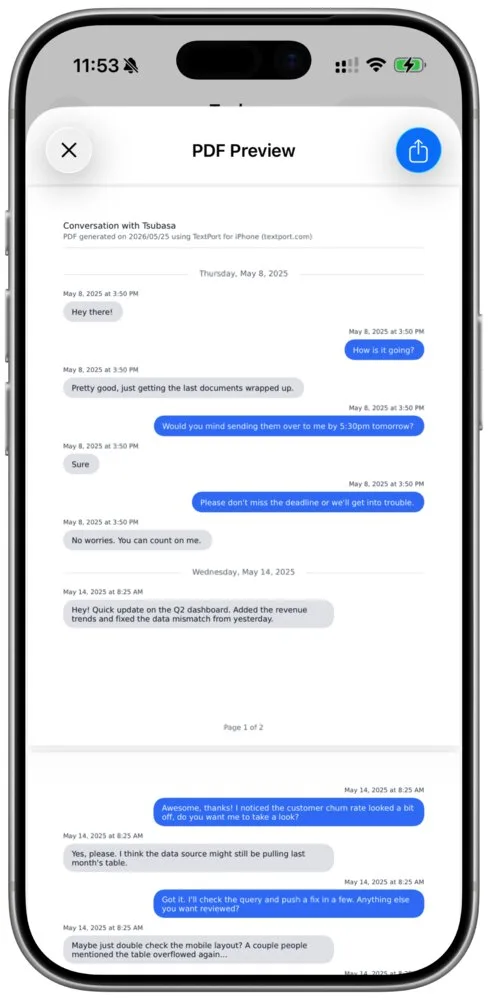
TextPort turns a conversation with a supervisor or coworker into one PDF on your iPhone, with no computer, ready for the EEOC interview and the EEOC Public Portal.
- iMessage and SMS come in through the TextPort Shortcut (iOS 26.4 or later), word for word with each message's date and time, for the date range you pick.
- WhatsApp comes in from WhatsApp's own Export Chat file. Messenger, Instagram, Signal and other apps come in from screenshots or a screen recording, which TextPort reads, so check the result against your phone before you export.
- The export is a PDF with the sender, date and time above every message and numbered pages, a CSV spreadsheet, or plain text. Photos from iMessage and WhatsApp chats print in the PDF. You can send it as a link instead of an attachment.
Frequently asked questions
-
Since March 30, 2026, you sign in to the EEOC Public Portal with a Login.gov account: an email address, a password and a second step, such as a code by text message or an authentication app. If you used the portal before, create the Login.gov account with the same email address. Booking the interview takes a different login: the EEOC Scheduler has its own user ID and password.
-
The EEOC itself says "Filing a formal charge of employment discrimination is a serious matter." Once you sign the charge, the EEOC must notify your employer within 10 days, and the notice includes your name. What you tell the EEOC before you file stays confidential, and it recommends an interview before you decide. Charges aren't public: the EEOC "will not disclose information related to a charge to the public."
-
Yes. Current employees, job applicants and former employees can all file if the employer is big enough for the law involved. Filing is protected: "All of the laws we enforce make it illegal for an employer to retaliate against someone who files a charge or someone who takes part in an EEOC investigation or lawsuit." If you're punished after filing, tell your investigator promptly so it can be added to your charge.
-
The EEOC says an investigation takes about 10 months on average, and mediation less than 3 months on average. Before that comes the wait for an intake interview, and the EEOC says demand for appointments is very high. Except for age claims, once 180 days have passed since you filed, the EEOC must give you a Notice of Right to Sue if you ask, though asking usually ends its investigation. You then have 90 days to sue; count them from the day the EEOC's email about the notice arrives.
-
Not one you fill in to file online. After your interview, the EEOC writes the Charge of Discrimination from what you told it and sends it to your portal account, where you can download it, ask for changes and sign it. To write it yourself, mail a signed letter with your contact details, the employer's, its number of employees, what happened and when, and why you think it was discriminatory. The EEOC warns: "Don't forget to sign your letter. If you don't sign it, we cannot investigate it."
-
Of the 90,744 charges the EEOC resolved in fiscal year 2025, 63.4% ended with a finding of no reasonable cause, 18.5% were administrative closures, 7.5% settled, 7.4% were withdrawn after the worker got benefits, and 2.6% ended in a reasonable-cause finding. Mediation did better: 70% of the 11,346 mediations held that year were resolved. A no-cause finding still comes with a Notice of Right to Sue, so you can go to court within 90 days; count them from the day the EEOC's email about it arrives.
Start exporting your messages
Available for iPhone, Mac, and Windows. No computer required.