
How to Get a Transcript of Text Messages on iPhone (Any Chat App)
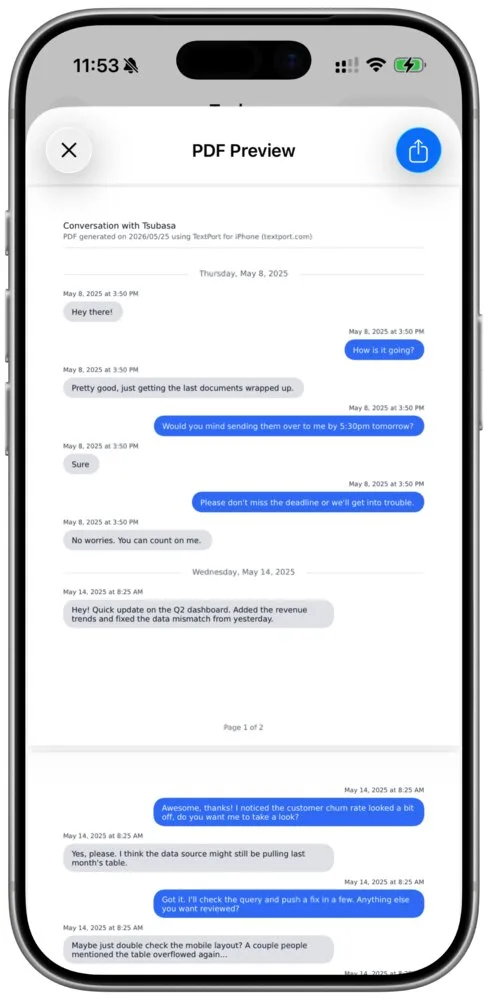
Your phone company won't give you a transcript of your texts: its records show who texted whom and when, not what was said. The words are on your phone, so you make the transcript there. On an iPhone, TextPort turns a chat into a PDF with the sender and time on every message. It reads Messages and WhatsApp chats directly. For any other chat app, it works from screenshots or a screen recording.
You can import your first three conversations in TextPort for free. If you only need a few lines, there's also a free way at the end.
Pick your route
Start from what you have. The route decides how exact the transcript is and how much checking it needs.
| What you have | What to do | What you get |
|---|---|---|
| An iMessage or SMS chat on your iPhone | Import it with TextPort's Apple Shortcut (iOS 26.4 or later) | Every message word for word, with dates and times |
| A WhatsApp chat | Use WhatsApp's Export chat and open the file in TextPort | The chat exactly as WhatsApp saved it |
| A chat in Instagram, Messenger, Signal, Telegram, Snapchat or any other app | Screenshots or a screen recording, imported into TextPort | A transcript you review and fix before you export |
| Your whole Messages history on a Mac | TextPort for Mac, free, no account | Every conversation as PDF, CSV or TXT |
| An iPhone and a Windows PC | TextPort for Windows, free, no account | Every conversation as PDF, CSV or TXT, from an iPhone backup |
| A few lines, no app | Copy them with Live Text | Plain text you paste into a note |
Why your phone company won't give you one
A carrier's records are a log, not the conversation. For messages, Verizon's usage page lists the time and date, the number of messages, and the mobile numbers of the sender and recipient. None of it is what was said.
Even the police generally need a warrant to get the words. Verizon's transparency report for the first half of 2026 says it does "not release the contents of communications (such as text messages)" in response to subpoenas, and releases stored content to law enforcement only with a probable cause warrant. AT&T's August 2025 report says stored text messages "generally" require a warrant too, and T-Mobile's 2022 report puts stored text messages, "if stored", among what needs a search warrant.
iMessages don't travel as carrier texts at all. Apple says iMessage is sent over Wi-Fi or cellular data and is encrypted end to end. For records requests and other legal routes, see how to get text message records.
iMessage, SMS and WhatsApp: no screenshots needed
For Messages, TextPort's Apple Shortcut import copies the chat you pick, for the dates you pick, word for word with dates and times. It needs iOS 26.4 or later. For WhatsApp, open the chat, tap the name at the top, scroll down, tap Export chat and choose TextPort; the steps are in how to export WhatsApp chats. Neither reads the chat from an image, so take this route whenever your chat allows it. If your iPhone can't run iOS 26.4, the steps in the next section work for Messages too. For a whole history on a computer, use the free Mac or Windows app from the table above.
Any other app: turn screenshots or a screen recording into a transcript
This is the route for any chat app, and the one most people already have half done. In TextPort's Texting as Evidence 2026 survey of 1,081 U.S. adults, 81% said they had screenshotted a text or DM because they might need it as proof. Screenshots alone are a pile of images, though. A transcript puts every message in one order, with a sender and a time on each line.
- Capture the chat. Pick one way:
- Screenshots. Open the chat at the oldest message you need. Show the times first: in Messages, drag a bubble to the left; in other apps, tap a message. Close the keyboard and any pop-ups, and don't zoom. On a Face ID iPhone, press the side button and the volume up button together, scroll a little toward the newer messages, and take the next one so the last message or two of one screenshot are the first of the next. TextPort uses that overlap to line the images up, and to drop repeated messages. There's no hard limit: long chats with hundreds of screenshots work, but take longer.
- A screen recording. In TextPort, tap Add Chat, pick the app, tap the first card (On Your iPhone, or Import with Scroll Capture for Messages), then Start Screen Recording and Start Broadcast. Open the chat and scroll down from the oldest message to the newest, keeping each message on screen for about a second. The recorder stops by itself after up to 15 minutes, so record a longer chat in parts. Already recorded the chat with Control Center? Long press Start Screen Recording and pick the video from Photos instead.
- Import it. For screenshots, tap Add Chat, pick the app, tap the first card (On Your iPhone, or Import with Scroll Capture for Messages), open the Screenshots tab, tap Import Screenshots, select them in the order you took them and tap the checkmark. For a recording, trim off anything that isn't the chat and tap Start Processing. The chat appears in Saved Chats when it's ready. The screenshot guide and the Scroll Capture guide show each screen.
- Check it against the chat. Read the transcript next to the original conversation. Long press any message to fix its text, its time or who sent it, or to delete it. If a message is missing, you can't type it in by hand: retake the screenshot that has the gap, with more overlap, and import again. Correct what was misread so the transcript matches the chat, and never reword what anyone said.
- Export it. Tap Export and choose PDF, or Print, CSV or TXT. If a screenshot has a photo in it, the PDF shows a short text note where the photo was, not the photo itself.
What your transcript should show
A transcript someone else can follow answers four questions: who is in the conversation, who sent each message, when, and whether anything is missing. Here's how a TextPort PDF answers them:
- Who it's between. Page one names the people in the chat ("With:"), your own name and number when TextPort knows them, and the date the PDF was made.
- Who and when, on every message. Above each message is the sender's name, their number or email when TextPort has it, and the date and time.
- Each day marked. A date line opens every new day of the conversation (unless you turn timestamps off).
- Every page numbered. Each footer says "Page 3 of 12" (or whichever page it is), so a missing page shows.
- A reference ID. Each footer carries an ID that starts with TP-. The same messages printed the same way get the same ID. It's a reference for finding the document again, not proof the messages are real.
The text in the PDF is real text, so you can search it. If the transcript is for a hearing, read can text messages be used in court and are screenshots of text messages admissible next; your court and your lawyer have the final word.
Free ways, and where they stop
- Live Text. On an iPhone XS, XR or later with iOS 15 or later, open a screenshot in Photos, touch and hold a word and tap Copy, or tap Select All. It's quick for a few lines. Names, times and the order between screenshots are up to you.
- A chatbot. ChatGPT reads text in uploaded images on free and paid plans. You'll still need to put the messages in order, check every name and time, and format the result yourself.
- Messages on a Mac. Apple documents how to print or create a PDF of a conversation in Messages on Mac. It covers Messages only.
Sources and dates
- Verizon, U.S. Transparency Report, first half of 2026, and View usage on your bill.
- AT&T, Transparency Report, August 2025.
- T-Mobile, Transparency Report for 2022.
- Apple, About iMessage and SMS/MMS, take a screenshot, record your screen, Live Text and delete messages and attachments.
- OpenAI, ChatGPT image inputs FAQ.
- TextPort, The State of Texting as Evidence 2026: 1,081 U.S. adults, online panel, fielded June 12 to 16, 2026, unweighted.
Frequently asked questions
-
Only if they still exist somewhere you can reach: your iPhone, a Mac that has your Messages, or an iPhone backup on a Windows PC, which TextPort for Windows can read. Check Settings > Apps > Messages > Keep Messages: any choice other than Forever removes older conversations, and deleted messages stay in Recently Deleted for up to 30 days. If the chat is still there, any of the routes above works.
-
It can read the text in screenshots you upload. OpenAI says how many images fit in one chat depends on their size, and that it doesn't do as well with non-Latin scripts such as Japanese or Korean. Check every line against the screenshots, because names and times are the parts you can't afford to get wrong.
-
No. TextPort is a software tool, not a law firm or court reporter, and it doesn't produce certified or authenticated transcripts. A TextPort PDF is print-ready for court. See can text messages be used in court for how that works. This is general information, not legal advice.
-
TextPort's rule of thumb is about 40 pages for a 1,000-message chat.

Start exporting your messages
Available for iPhone, Mac, and Windows. No computer required.