
Text Message Harassment: How to Report Threatening or Harassing Texts
If a text threatens to hurt you or someone close to you and you think they might act on it, call 911. For harassing texts that aren't an emergency, save the whole conversation first, then report it to your local police through the non-emergency line or in person, and keep the report number. If the messages came through WhatsApp, Instagram, Snapchat or Messenger, you can report the account to the app as well, after you've saved the chat.
Two common steps backfire. Forwarding the texts to 7726 reports them as spam, not harassment. And on an iPhone, Apple says Delete and Report Spam sends an iMessage to Apple and "the message is permanently deleted from your iPhone." Blocking can be the right choice for your safety, but once you block a number, you'll stop receiving the texts that prove they kept going.
This is general information, not legal advice. Harassment laws differ by state. The National Domestic Violence Hotline can help you plan, at 1-800-799-7233, by texting START to 88788, or by chat at thehotline.org.
Is text message harassment illegal?
Often, yes. Federal law covers three kinds of messages:
- Anonymous messages meant to harass. Using a phone or "telecommunications device" without "disclosing his identity and with intent to abuse, threaten, or harass any specific person," or repeatedly contacting someone "solely to harass" them, can bring up to two years in prison (47 U.S.C. § 223). The definition leaves out "an interactive computer service," so it may not reach app messages.
- Threats across state lines. "Any threat to injure the person of another" sent in interstate commerce can bring up to five years (18 U.S.C. § 875).
- Stalking. A course of conduct through "any interactive computer service or electronic communication service" that causes fear or substantial emotional distress (18 U.S.C. § 2261A).
Most cases are handled under state law. Some examples:
| State | One threatening text | Repeated harassing texts |
|---|---|---|
| California | A misdemeanor if sent "with intent to annoy" and containing "any threat to inflict injury" (Penal Code § 653m) | "Repeated contact by means of an electronic communication device" with intent to annoy or harass is a misdemeanor |
| Texas | Threatening bodily injury "in a manner reasonably likely to alarm" (Penal Code § 42.07) | "Repeated electronic communications" meant to harass; threats from "a temporary or disposable telephone number" are covered too |
| New York | Aggravated harassment, a class A misdemeanor, for a threat of physical harm sent "by computer or any other electronic means" (Penal Law § 240.30) | Harassment, a lesser "violation," for repeated acts that "alarm or seriously annoy" and "serve no legitimate purpose" (§ 240.26) |
| Florida | Not stalking on its own, which needs a pattern. But a threat "delivered by electronic communication" on top of stalking makes it aggravated stalking, a felony (§ 784.048) | Cyberstalking: a course of conduct through electronic communication causing substantial emotional distress |
Two patterns run through all of these. A single message can be a crime when it's a threat; insults and constant messages generally need to be repeated. And intent matters. For threats, the Supreme Court held in Counterman v. Colorado (2023) that "a recklessness standard is enough": the sender was aware "that others could regard his statements as" threatening violence and "delivers them anyway." The sender doesn't have to plan to carry it out. Florida's law says so directly: "It is not necessary to prove that the person making the threat had the intent to actually carry out the threat."
Step 1: Save the conversation before anything else
Whatever you decide to do next, do this first. Police, an app's safety team and a judge all need to see the messages, and most of the ways people make the texts stop also make them disappear.
- Save the whole conversation, not just the worst message. Include your own replies, so the context is clear.
- Show the sender's number, not only the name you saved them under. NNEDV's Safety Net project suggests a screenshot of the contact page "to show that the harassing messages from the abuser are associated with the abuser's phone number."
- Make sure every message has its date and time.
- Don't tap Delete and Report Spam (Delete and Report Junk on iOS 18). Apple says the message "is permanently deleted from your iPhone." You can recover it from Recently Deleted "for up to 30 days," but it's easier not to lose it.
- Turn off auto-delete. On iPhone, go to Settings > Apps > Messages > Keep Messages and choose Forever. If you use Messages in iCloud, deleting a conversation on one device deletes it everywhere.
- Store a copy where the sender can't reach it. If they know your passcode or share your iCloud or Google account, keep your copy in an account they've never had access to.
If the messages are in an app with disappearing messages, capture them as soon as you see them. Some apps tell the other person when you screenshot a chat.
Step 2: Decide whether it's a 911 call
Call 911 when a message threatens violence and you believe it could happen, especially if it says they're nearby or coming. San Jose police put it this way: "If the caller has made specific threat(s), and there is an indication the threat(s) may be carried out, call 911." Gastonia, North Carolina, tells people receiving threatening calls not to file online at all, but to call dispatch.
If you can't speak safely, 911.gov advises: "call 911 if you can, and text if you can't." But "Text-to-911 is only currently available in certain locations," so don't rely on it without checking yours.
For everything else, use your police department's non-emergency number, go to the station, or file online if your department allows it for your situation.
Step 3: Report it to the police
What to bring. The saved conversation, printed if you can; a list of every number or account the person has used; a short timeline of what happened and when; and anything else connected, such as voicemails, call logs, or times they showed up in person. Womenshealth.gov advises: "Make sure to tell them about all threats and incidents." A pattern is often what turns separate messages into a crime.
Online reports are usually only for strangers. Police departments that take harassment reports online generally limit them to unknown senders and non-emergencies. Stockton, California, says you can file online "if you do not know the person calling or texting," and not if the incident involves domestic violence. San Jose tells people who know anything about the sender to go to the station or call the non-emergency line instead. If you know who it is, plan to talk to an officer.
Get the report number. It's how you, the police and anyone else you deal with refer back to it. Fort Worth tells people to give it to their phone company. A protective order judge or HR may ask for it, and each report adds a dated entry from someone other than you.
Ask about preserving records. Carriers keep records for a limited time. NNEDV suggests that if you're working with police, "ask them to send a preservation letter to the phone company as soon as possible."
Know the limits. Police may not be able to act on one report, especially when the sender is hard to identify. Kansas City police warn that because numbers can be spoofed, "Caller ID is not sufficient evidence to prove the callers' ID beyond a reasonable doubt. A police report may be taken. However, it may not be prosecuted without sufficient evidence." Keep reporting new incidents. You don't need police to file charges to ask a court for a protective order; see can you get a restraining order for text messages.
Step 4: What your phone carrier can and can't do
Your carrier is less help than most people expect.
- 7726 is for spam. Verizon describes spam as messages "directed to large numbers of users for the purposes of advertising, phishing, spreading malware," and the FTC says forwarding to 7726 "helps your wireless provider spot and block similar messages in the future." It isn't a harassment report, and nobody investigates the sender for you.
- Carriers can block numbers. Verizon lets you block up to 5 numbers free for 90 days in My Verizon; AT&T's ActiveArmor block list keeps numbers blocked "until you remove them from the list."
- Carriers give records to police, not to you. Call Trace, where carriers still offer it, is a landline feature, and AT&T says it "will only provide trace information to your law enforcement agency, not to you."
- You can leave a shared plan. If the person harassing you controls your phone account, the federal Safe Connections Act lets survivors of domestic violence and related abuse "separate their line, or their abuser's line, from a shared account" (T-Mobile). T-Mobile, for example, asks for documentation, such as a police report or a protective order. NNEDV warns that someone on your phone account may be able to see your call logs.
Step 5: Block and report in the app, after you've saved the chat
Reporting to the app can get an account suspended, but it doesn't preserve evidence for you, and the company keeps what it's sent. Here's what each app says happens:
| App | Blocking | Reporting |
|---|---|---|
| iPhone Messages | New messages "aren't delivered." Apple doesn't say whether the old thread is affected | Delete and Report Spam sends an iMessage "to Apple with the sender's information" and deletes it from your phone |
| "the existing chat will remain in your chatlist" | Sends "up to five of the last messages they've sent to you." "The user or group won't be notified" | |
| Threads "remain in your Direct inbox." Messages sent while blocked are never delivered, even if you unblock | Instagram reviews "up to 30 of the most recent messages." "The account you reported won't see who reported them" | |
| Messenger | "Your message history with a profile you've blocked will stay in your inbox" | Meta reviews "up to 30 of the most recent messages" |
| Snapchat | "any active one-on-one conversations will no longer be visible," and saved messages "may be removed" | Snapchat says it doesn't share "who submitted the report" |
Two cautions. On Snapchat, save everything before you block, because the conversation disappears from your view. And when reporting a WhatsApp group, leave the "Exit group and clear chat" box unchecked unless you've already saved it.
Whether to block at all is your call. It stops the messages, which can be a relief, but the National Domestic Violence Hotline cautions that "blocking or attempting to block the stalker's access to you could cause them to retaliate further," and womenshealth.gov notes "some people leave their number active so they can collect evidence." An advocate can help you weigh it.
What about the FCC and FTC?
They're not the place for a person harassing you. The FCC takes complaints about robocalls, telemarketing and spoofed numbers, and says it "doesn't resolve individual complaints but uses them to guide policy and possible enforcement." The FTC collects reports of "fraud, scams, and bad business practices." Report scam texts there. Report harassment to the police.
If it's happening at work or school
Report it there too, in writing, and keep a copy. If a coworker or supervisor is harassing you by text because of your sex, race, religion, disability, age or another protected trait, federal law treats it as workplace harassment, and the EEOC says employees "should also report harassment to management at an early stage to prevent its escalation." Students can report to the school, which usually has its own harassment policy. Workplace and school reports don't replace a police report when you're threatened.
Should you reply?
Safety advocates generally say: once, if at all. Womenshealth.gov suggests you "send the person one clear, written warning not to contact you again. If they contact you again after you've told them not to, do not respond." The Hotline adds that "acknowledging their behaviors with a reply to their harassment is likely to be taken as a sign that these tactics are working." A single written request to stop also helps later: several states' harassment and protective order laws look at whether the person was told their contact was unwanted.
If replying at all feels unsafe, skip it and talk to an advocate.
After you report: keep building the record
Harassment rarely stops after one report. Keep a log of each new message, call and incident with the date, time and any report number, and save every new conversation. How to prove harassment or stalking has a log you can copy and what courts look for. If you want a court order to stop the contact, start with can you get a restraining order for text messages.
Saving the texts as one dated PDF
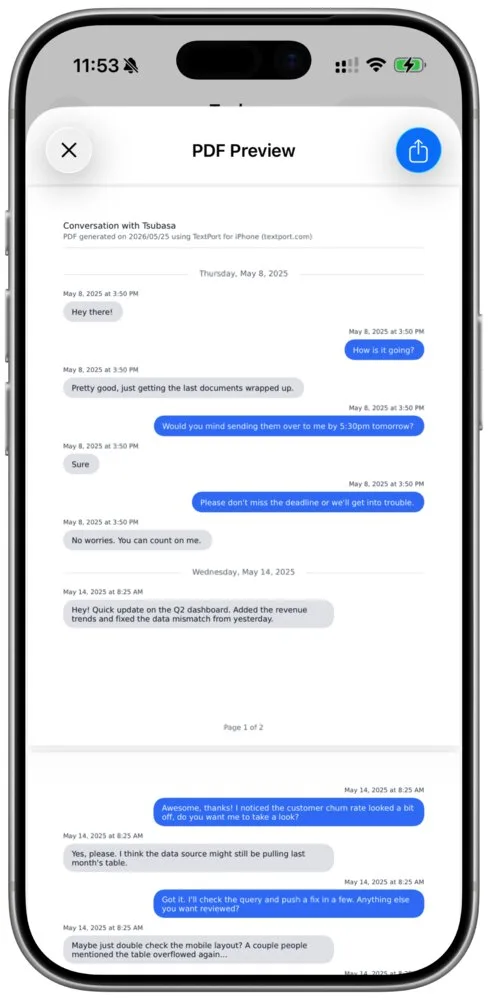
Officers and judges need something they can read and keep: the whole conversation, the sender's number and the date and time of each message. A stack of screenshots usually misses some of that. TextPort turns a conversation on your iPhone into one PDF, with no computer.
- iMessage and SMS come in through the TextPort Shortcut (iOS 26.4 or later), word for word with each message's own date and time, for the date range you pick.
- WhatsApp comes in from WhatsApp's own Export Chat file. Instagram, Messenger, Snapchat, Signal and other apps come in from screenshots or a screen recording, which TextPort reads, so check the result against your phone before you export.
- The PDF puts the sender and the date and time above every message, numbers every page, and can show each person's phone number next to their name.
TextPort never contacts the other person. Its PDFs aren't certified copies, so keep the original messages on your phone too. Your first three chats import for free; exporting needs a subscription. For more on documenting harassing messages, see documenting harassment text messages.
Frequently asked questions
-
It can be. Federal law covers anonymous messages sent to abuse, threaten or harass someone, repeated contact solely to harass, and any threat to injure someone sent across state lines. Every state has its own harassment law too. California makes repeated contact by an electronic device with intent to annoy or harass a misdemeanor, and Texas specifically names repeated electronic communications and threats sent from disposable numbers. Whether a particular set of texts is a crime depends on the words, the pattern and the sender's intent.
-
You can report any text that scares you. Whether one text is a crime depends on what it says: a single threat to hurt you or your family can be enough under California, Texas and New York law and under federal law if it crossed state lines. Insulting or annoying texts usually need to be repeated. Either way, a report creates a dated record if things get worse.
-
No. 7726 (SPAM) is for spam: mass messages for advertising, phishing or malware. Your carrier uses it to block similar messages, not to investigate a person who's harassing you. Verizon's own steps end with "Delete the message," which is the opposite of what you want. Save the conversation and report it to the police instead.
-
Sometimes. You can't get the account holder's details from a carrier or app yourself, but police can request records through legal process. Tell them every number and account name the person has used. Kansas City police warn that caller ID can be spoofed, so a number alone may not be enough to charge someone. Messages from free texting apps and disposable numbers are harder to trace, though Texas makes threatening someone from one a crime in itself.
-
Not from the apps. WhatsApp says the user "won't be notified" of a report, Instagram says "the account you reported won't see who reported them," and Snapchat says it doesn't share who reported. A police report is different: if police contact the person or charges are filed, they'll learn about it. If that could put you at risk, talk to an advocate before you report.
-
Log each new number with the date it first appeared, and save every conversation before you block it. Switching numbers or accounts after being blocked is evidence of a pattern in itself: the 2023 Supreme Court threats case involved a man who opened a new account each time he was blocked. Give police the full list.

Start exporting your messages
Available for iPhone, Mac, and Windows. No computer required.