
How to Report a Scammer (Texts, Calls, Marketplace and Online)
To report a scammer, save the conversation first, then report it to the Federal Trade Commission at ReportFraud.ftc.gov and, if it happened online or by phone, to the FBI's Internet Crime Complaint Center (IC3) at ic3.gov. If you sent money, call your bank, card issuer or payment app and ask it to reverse the payment; the call deletes nothing, so make it first if the money just left. Then report the number or account where it happened, and file with your state attorney general and local police when you need a report on record.
In 2025, people filed 3 million fraud reports with the FTC and reported $15.9 billion in losses, and "receipt of a text message was the top reported contact method in 2025 when consumers identified a contact method" (FTC testimony to Congress, March 2026). IC3 received 1,008,597 complaints reporting $20.877 billion in losses that year. Yet the buttons that report a text often delete it, and neither the FTC nor IC3 takes attachments, so the copy you keep is the one an investigator may ask for.
This is general information, not legal or financial advice. Refund rules depend on your bank or app's terms, and state rules differ. If you're in immediate danger, call 911. For help with your case, contact a local legal aid office.
How to report a scammer, step by step
- Stop replying, and don't pay anyone to get your money back. Don't call their numbers or tap their links; the FCC says "never click links in these messages." Anyone who offers to recover your money for a fee is a second scammer.
- Export the text messages before you report or delete anything. If the scammer texted you, save the conversation for the dates involved as a PDF with the sender's name or number and the date and time on every message. TextPort does this on an iPhone, with no computer. Reporting can erase the evidence: Apple says a reported iMessage is sent to Apple and "the message is permanently deleted from your iPhone," Verizon's 7726 steps end with Delete the message, and the IRS says to "Delete the original text." Screenshot the number and date too, for agencies that want one. If money just left your account, make step 3's call first; it deletes nothing.
- Call your bank, card issuer or payment app if you paid. Ask it to reverse the payment. For a bank transfer, the FBI says "time is of the essence" and tells you to ask your bank to request a recall of the funds. Deadlines are in the table below.
- Report it to the FTC at ReportFraud.ftc.gov. It asks who contacted you, from what number, when, and what you paid, how and when. "You cannot attach documents to the form," so paste the key messages from your saved copy into Comments, without Social Security or bank account numbers. Finish in one sitting and keep the report number. For a large loss, the FTC can refer your report to the FBI team that tries to freeze the money, if you agree.
- File with the FBI at ic3.gov if it happened online or by phone. IC3 counts phone scams because "almost all telephone calls utilize internet technology." Give each payment's date, amount and recipient, and the scammer's name, number, email or website. IC3 takes no attachments either: paste the text in, keep the originals, and save or print your copy before you leave the page, because IC3 won't email it.
- Report the number or account where it happened. Forward scam texts to 7726 and keep the original, report Marketplace sellers to Facebook, and send fake USPS, IRS or Social Security messages to that agency (details below).
- File with your state attorney general, especially if a business or online seller was involved (table below).
- File a police report if you lost money or someone used your identity. Bring the saved conversation and your report numbers, and for identity theft, use IdentityTheft.gov too.
Getting your money back: deadlines by payment method
Federal law or the company's terms set the deadline.
| How you paid | Who to tell | Deadline | What's covered |
|---|---|---|---|
| Debit card or bank account, money you didn't send | Your bank or credit union | Card, PIN or security code lost or stolen: within 2 business days of learning of it, your loss is capped at $50 (up to $500 after). Any transfer you didn't make: no later than 60 days after the statement showing it, or you can owe for transfers after that | Transfers someone else made, including with a login or texted code they tricked out of you |
| Credit card | The card issuer: call, then write | Call right away about a charge you didn't make. A dispute letter must reach the issuer within 60 days after the first bill with the charge | Unauthorized use (at most $50, and nothing if only your card number was used), and goods not delivered as agreed |
| Zelle | Your bank or credit union | Right away; for a payment you didn't send, the 60-day rule in the first row applies | Payments someone else made: typically reimbursed. Payments you sent: only certain impostor scams |
| Venmo | Venmo | 180 days from the purchase | Purchase Protection, only for payments marked as goods and services |
| PayPal | PayPal | Item not received: 180 days from payment. Significantly not as described: 30 days from delivery or 180 days from payment, whichever is sooner. Escalate to a claim within 20 days of opening the dispute | Purchase Protection; friends and family payments are excluded, and so are item-not-received claims for things you collect in person, unless you paid with a PayPal QR code |
| Venmo, PayPal, Cash App | The app | At once, and no later than 60 days after the statement showing a transfer you didn't make. Cash App caps your loss at $50 if you tell it within 2 business days of learning of it | Unauthorized transfers. Cash App warns of "the loss of your funds with no recourse" to scams |
Sources: Regulation E § 1005.6, the CFPB, Regulation Z § 1026.12 and § 1026.13, the FTC on disputes and stolen card numbers, Zelle, the Venmo User Agreement, PayPal's Purchase Protection Program (last updated January 26, 2026) and User Agreement, and Cash App's terms.
- Tricked into giving your login or a code? The CFPB says that if someone tricks you into sharing your login or a texted code and then uses it to move money out of your account, the transfer is unauthorized under Regulation E (CFPB). Your carelessness can't be used to make you pay more. The bank generally has 10 business days to investigate, or must credit you temporarily and finish within 45 days (90 in some cases).
- Zelle draws its own line. "A scam is when you knowingly send money but do not receive what you expected in return." Refunds for those are Zelle's policy, not federal law: it says it "goes above and beyond what is required by law" for certain impostor scams. Report it to your bank, not to Zelle.
- Gift cards, wires, crypto and cash. Call the gift card company, wire company or crypto exchange immediately, and keep the gift card and receipt. For cash sent through the U.S. mail, call the Postal Inspection Service at 1-877-876-2455 (FTC).
- No police report needed first. Federal Reserve examiners list "indicating the consumer must file a police report" among conditions a bank may not set before investigating a transfer. A credit card issuer may ask for a copy, "if one was filed".
How to report a scam text
The FTC lists three ways: forward the text to 7726, report it in your messaging app, and report it at ReportFraud.ftc.gov (FTC). Save the conversation before any of them.
- 7726 (SPAM). AT&T and Verizon text back asking for the sender's number. Verizon's steps start with "Confirm the text message is still available on the device" and end with deleting it. Skip that last step.
- iPhone. Tap Report Spam under a message from an unknown sender, then Delete and Report Spam (Delete and Report Junk on iOS 18). An iMessage goes to Apple and is permanently deleted; an SMS, MMS or RCS report may go to your carrier. You can recover the original from Recently Deleted "for up to 30 days," but if you lost money, skip this button and keep the conversation. "You can't report a message after you've replied to it."
- Android (Google Messages). Reporting blocks the sender and moves the chat to Spam & blocked, sending Google the last 10 incoming messages (Google).
Impostor texts have their own inboxes:
- USPS: email [email protected] and "attach a screenshot of the text message showing the phone number of the sender and the date sent." USPS doesn't text you unless you asked for tracking, and those texts have no link.
- IRS: "We don't send text messages without your permission." Email [email protected], subject line Text, with the sender's number and the message, your number, and the "Date, time and time zone received." Fake IRS calls go to TIGTA at 800-366-4484.
- Apple: email a screenshot to [email protected] (Apple).
- Social Security: report to the Inspector General at oig.ssa.gov/report (SSA).
For threats or harassment, 7726 is the wrong tool; see how to report harassing text messages.
How to report a scammer on Facebook Marketplace
Facebook says "you should stop communicating with the buyer or seller and report the suspected scam to Facebook." On a computer, its help page gives three routes:
- A seller: Marketplace > Buying, open the listing, click the seller's name, open the menu, click Report, then Scam.
- A buyer: Marketplace > Selling > Your Account > Seller dashboard, open the listing and your message with the buyer, then Report > Scam.
- A listing: open it, click the menu below the title, then Report Listing > Scam.
Purchase Protection covers eligible orders bought with checkout or shipping, not "local pickups, Messenger transactions, or through other messaging services." In reviewing a claim, Facebook may read "messages sent between you and the seller." For an order problem, contact the seller first, then Facebook support if they don't reply or fix it within 2 business days (Meta).
A buyer or seller who moves you to texts or WhatsApp is a warning sign: "Conversations that are routed off of Facebook or Messenger make detecting scams difficult to track." Your phone then holds the record, so save it.
Report it to your state attorney general
State consumer offices take scam reports, though their forms are built for complaints against a business.
| State | How to file | Uploads | Good to know |
|---|---|---|---|
| California | Online complaint form | PDF, Word or Excel only; no image files | The AG can't give legal advice or represent you |
| Texas | Online complaint | Images, PDFs, audio and video; up to 10 files, 25MB | Your complaint is public; you may not hear back |
| Florida | Online, or by mail; 1-866-966-7226 within Florida | Copies, not originals | Attachments are public records; the AG doesn't represent people seeking their money back |
| New York | Online, or the Help Line at 1-800-771-7755 | Check the online form | Mediation program handles over 12,500 cases a year |
| Washington | Online or by mail | Your documents are sent to the business | The business is asked to respond within 30 days, but can't be forced to |
Sources: California, Texas, Florida's form and page, New York's complaint and mediation pages, Washington.
California lists "Allowed file types: pdf, doc, docx, xls, xlsx," so screenshots have to go into a PDF first. Texas warns: "Know that under Texas law your complaint is open to the public." In Texas and Florida, where complaints are public, and in Washington, where the business gets a copy, black out account numbers before you upload. In 2025, New York's Attorney General asked Zelle scam victims to report to her office.
How to report fraud to the police
File a police report when money was stolen or someone is using your identity. Social Security's advice if scammers stole money: "Call your local police department to report the crime." IC3 doesn't investigate, and says "please contact local law enforcement directly if you believe your matter is time sensitive."
- How to file: the non-emergency line, the station, or online if your department takes fraud reports that way. How to file a police report for harassment covers getting a copy.
- What to bring: the conversation as a printed PDF, payment records, every number or account the scammer used, and your FTC and IC3 report numbers.
- Identity theft: in California, police where you live or have your place of business must take the report, give you a copy and begin an investigation (Penal Code § 530.6). Anywhere, IdentityTheft.gov gives you "a free personal recovery plan with next steps" and pre-filled letters. If you gave out your Social Security number but it hasn't been used, go to IdentityTheft.gov/databreach.
Watch for recovery scams
The FTC warns: "Scammers buy lists of people who've paid scammers." Then someone posing as an agency, a nonprofit or IC3 offers to recover your money for a fee. "Government agencies and legitimate organizations will never ask for money to help you get a refund," and "The IC3 will not ask for payment to recover lost funds".
Which messages to save, and how to hand them over
Save:
- The scam texts, with the sender's number showing, plus any links or payment instructions, and your replies, including any code you gave.
- The Marketplace chat, plus any texts or WhatsApp messages after they moved you off Facebook.
- Payment confirmations from your bank or app.
To stop your iPhone deleting old texts, go to Settings > Apps > Messages > Keep Messages and choose Forever. Save the whole conversation for the dates involved, with times and photos, and keep the original on your phone and a backup.
Paste the text into the FTC and IC3 forms and keep the PDF, since IC3 lists "Chat transcripts and/or telephony logs" as evidence to keep. Upload the PDF to a state complaint form that takes files, attach copies, not originals, to a bank or card dispute, and bring a printed copy to the police. If insurance might cover the loss, ask your insurer what it needs, and see how to export text messages for an insurance claim.
Saving the texts as one dated PDF
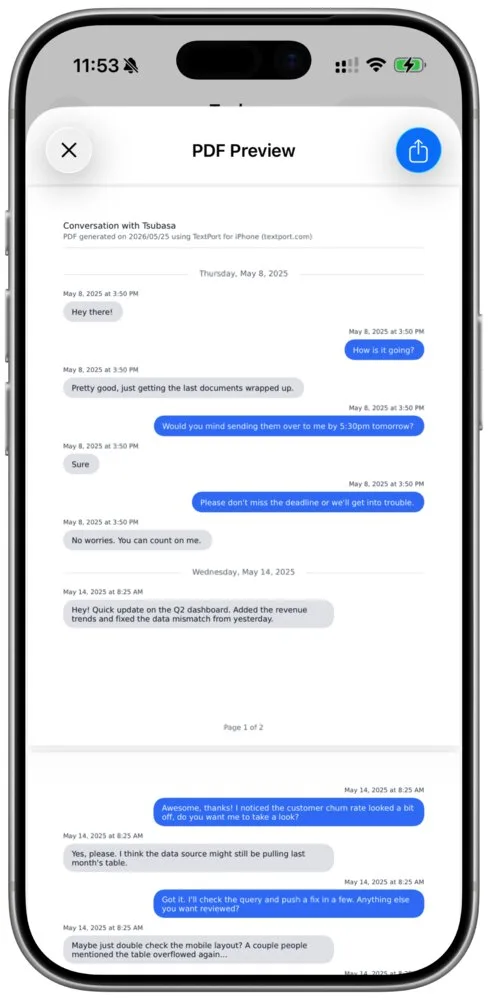
TextPort turns the conversation with the scammer into one PDF on your iPhone, with no computer, ready to upload to a state complaint form, attach to a bank dispute or print for the police.
- iMessage and SMS come in through the TextPort Shortcut (iOS 26.4 or later), word for word with each message's date and time, for the date range you pick.
- WhatsApp comes in from WhatsApp's own Export Chat file. Messenger, Instagram, Signal and other apps come in from screenshots or a screen recording, which TextPort reads, so check the result against your phone before you export.
- The export is a PDF with the sender, date and time above every message and numbered pages, a CSV spreadsheet, or plain text. Photos from iMessage and WhatsApp chats print in the PDF. You can send it as a link instead of an attachment.
Frequently asked questions
-
Yes, even though you probably won't hear back. An FTC report goes into Consumer Sentinel, a database open to federal, state and local law enforcement, and FTC staff use the reports to spot patterns and build cases. When a bank transfer is reported fast, the FBI's Recovery Asset Team can ask banks to freeze the money; it froze $679 million in 2025. But the FBI says "You will not hear from the IC3," and the FTC won't phone you about your report.
-
Call the bank, card issuer or payment app you paid with right away and ask it to reverse the payment. For a bank transfer, the FBI says to ask your bank to request a recall of the funds, and to file at ic3.gov whatever the amount. Credit card payments, including ones for something that never came, and transfers you didn't make have federal protections; a payment you sent yourself on Zelle, or as a personal payment on Venmo or PayPal, is much harder to get back. Never pay anyone who offers to recover your money for a fee.
-
For a transfer you didn't make from your bank account, report it no later than 60 days after the statement showing it, or you can owe for transfers after that, and within two business days of learning your debit card or PIN was lost or stolen to keep your loss to $50. Call your card issuer right away about a charge you didn't make; a credit card dispute letter must reach the issuer within 60 days after the first bill with the charge. Venmo and PayPal give 180 days for purchase protection claims on goods-and-services payments, but PayPal's window for an item significantly not as described is 30 days from delivery if that comes sooner, and PayPal closes a dispute you don't escalate to a claim within 20 days. Don't wait for any of these.
-
Only through Purchase Protection, which covers eligible orders bought on Marketplace with checkout or shipping. Facebook says "Purchases made through third-party sites, local pickups, Messenger transactions, or through other messaging services don't qualify for Purchase Protection." If you paid a local seller with Zelle, Venmo, PayPal or a card, ask that company instead.
-
Call your police department's non-emergency line, go to the station, or file online if your department takes fraud reports that way. Bring the saved conversation, your payment records and your FTC and IC3 report numbers, and ask for the report number. Social Security tells people whose money was stolen to call their local police, and the FBI says to contact local police directly when a matter is time sensitive. A bank can ask whether you filed one, but it can't make a police report a condition of starting its investigation of an electronic transfer.
-
Save the conversation first, with the sender's number and the date. Then forward the text to 7726 (SPAM) and report it at ReportFraud.ftc.gov. Use your phone's report button only once you no longer need the original: on an iPhone, Delete and Report Spam sends an iMessage to Apple, and "the message is permanently deleted from your iPhone." Fake USPS texts go to [email protected] with a screenshot, and fake IRS texts to [email protected].

Start exporting your messages
Available for iPhone, Mac, and Windows. No computer required.